

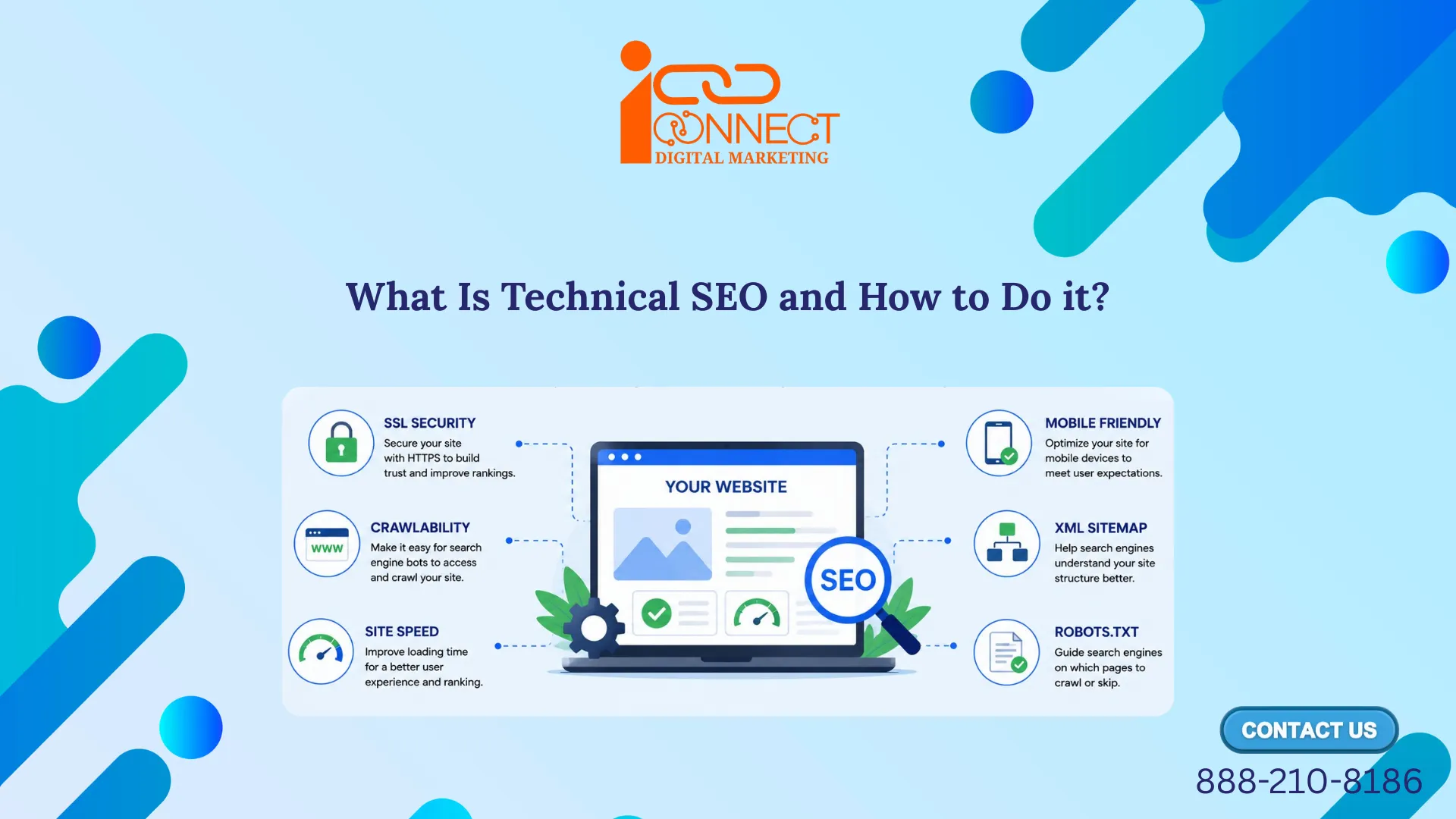
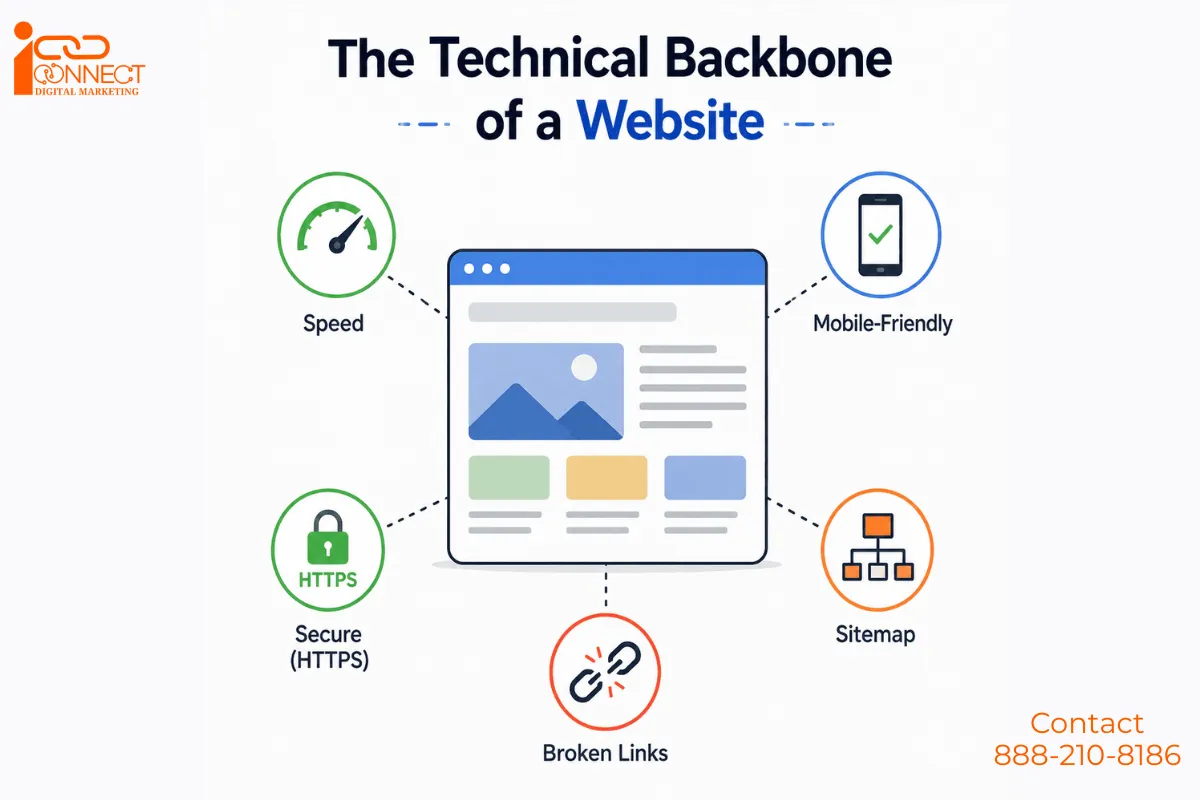
Technical SEO is all about making sure that everything is working properly in the back end of your website so that the search engines could crawl, interpret, index, and rank your website pages in an effective way. Technical SEO covers crucial things like website speed, mobile-friendly websites, HTTPS Security, Crawlability, Indexability, XML Sitemap, Structured Data (Schema Markup), URL Structure, Internal Linking, Fix Broken Links, Core Web Vitals, and Duplicate Content.
On the other hand, unlike content SEO (writing articles) or off-page SEO (backlinks), technical SEO focuses on the website’s infrastructure. Content is your voice, backlinks are your references and technical SEO is if your door even opens to let people in.
You may also be interested in: 👉What Is Off-Page SEO and How to Do It?
Why Is Technical SEO Important?
Technical SEO is important because it ensures that a website is technically accessible, crawlable, indexable, fast, mobile-friendly, and easy for search engines and users to understand.
For Example: “A beautiful shop is useless if customers cannot enter it.”
Similarly, great website content is less useful if search engines cannot properly access it.
A Simple SEO Flow
Website → Crawl → Understand → Index → Rank → User visits
Can Google Even Reach Your Pages?
It may sound like an obvious question, but there are many websites which unintentionally keep Google from crawling or indexing important pages. It’s surprisingly common.
There’s this file known as “robots.txt” on each website. The purpose of the file is to tell the search engine what areas they should visit and those which they are not supposed to access. Making one mistake in this file can result to Googlebot blocking access to your website areas.
However, there’s an important difference between crawling and indexing. Most sites also submit a sitemap, which is really a collection of important URLs that you want search engines to discover and consider for crawling and indexing.
A sitemap helps Google discover important URLs, but it does not guarantee that Google will crawl or index every URL. Therefore, we should generally include the canonical, preferred URLs rather than every URL that exists on the website.
Crawling vs Indexing: What’s the Difference?
If you’re new to SEO, crawling and indexing can sound like the same thing. They are not.
🕷️ 1. What is Crawling?
Crawling is the process where search engine bots, such as Google’s Googlebot, discover URLs and access their content.
For Example: Suppose your published URL is:
example.com/best-running-shoes
Googlebot discovers this URL through your sitemap or an internal link and visits the page.
👉 This is crawling. “Google has come to visit your webpage.”
🗂️ 2. What is Indexing?
After crawling a page, “Indexing is the process where a search engine analyzes the content of a crawled web page and stores information about it in its search index, making the page eligible to appear in relevant search results.”
“An index is like a huge digital library catalog. Google stores information about web pages in this index so that it can quickly find relevant pages when someone performs a search.”
You may also be interested in: 👉What Is Crawling and Indexing in SEO?
How to Do Technical SEO: A Practical Process
Now that we understand what Technical SEO is and why it is important, let’s look at the key steps involved in implementing Technical SEO and optimizing a website for search engines. In addition, it helps users get a fast, secure, and smooth experience.
Step 1: Check Website Crawlability 🕷️
The first step is to make sure that search engines can find and access the important pages of our website. Search engines use bots, such as Googlebot, to discover and crawl web pages.
Start with your robots.txt file and make sure you haven’t accidentally blocked important sections of your website.
For Example: Suppose your website has an important page with URL:
example.com/seo-course
However, you accidentally block this page through robots.txt. As a result, Google may not crawl the page properly.
Step 2: Check Indexability
Once you know Google can crawl your pages, check whether it can index the pages that you actually want to appear in search results. Look for accidental “noindex” directives, incorrect canonical tags, or other technical settings that could prevent important pages from appearing in Google’s index.
You can use Google Search Console’s URL Inspection tool to check the indexing status of individual URLs.
For Example: Suppose you have this important page:
example.com/digital-marketing
But the page contains:
<meta name=”robots” content=”noindex”>
This instruction tells search engines not to index the page. Therefore, always check your important pages for accidental “noindex” instructions.
Step 3: Create an XML Sitemap
The next important step is to create the XML sitemap for the website. For creating a sitemap you can search on google for “Free XML Sitemap Generator Tool” and this tool will help you generate the sitemap for your website. It has to be properly functional and should include those URLs which need to be found by Google. The function of an XML sitemap is to have an index of URLs.
Also, when we create our website through WordPress, the SEO plugin automatically generates an XML sitemap for our website. After checking it, we need to submit the sitemap through Google Search Console.
Step 4: Optimize the Robots.txt File
Robots.txt allows you to have control over areas on your website that can be accessed by search engine crawlers. For you to make your robots.txt file work effectively, there are certain requirements that we need to adhere to, such as putting the file in the website root directory for controlling the crawl traffic and saving your crawl budget.
For Example:
User-agent: *
Disallow: /admin/
Sitemap: https://example.com/sitemap.xml
Here, the website tells search engine crawlers not to crawl the /admin/ section.
Step 5: Improve Website Speed as Nobody Waits Around for a Slow Website
Try this yourself. Open a slow site on your phone and count how long you actually wait before hitting back. Three seconds? Maybe less.
Google tracks this too, not because it’s being picky, but because a slow site is a bad experience, plain and simple. And Google’s entire job is sending people to good experiences.
There’s a lot about this process, which is very unglamorous but necessary. Make sure that you compress your images, clean out the unnecessary code from the website, and use good hosting services. Not glamorous, but effective.
Google actually has a name for how it measures this now, Core Web Vitals. The criteria include page load time, usability speed, and whether stuff jumps around while it’s loading (the one where just before you’re going to click on something, the page moves and you end up clicking the wrong thing). That’s exactly what this measures.
For Example: Imagine there are two websites:
Website A: Loads in 2 seconds
Website B: Loads in 8 seconds
A user will generally have a better experience with Website A. A faster website creates a better experience and supports good technical SEO.
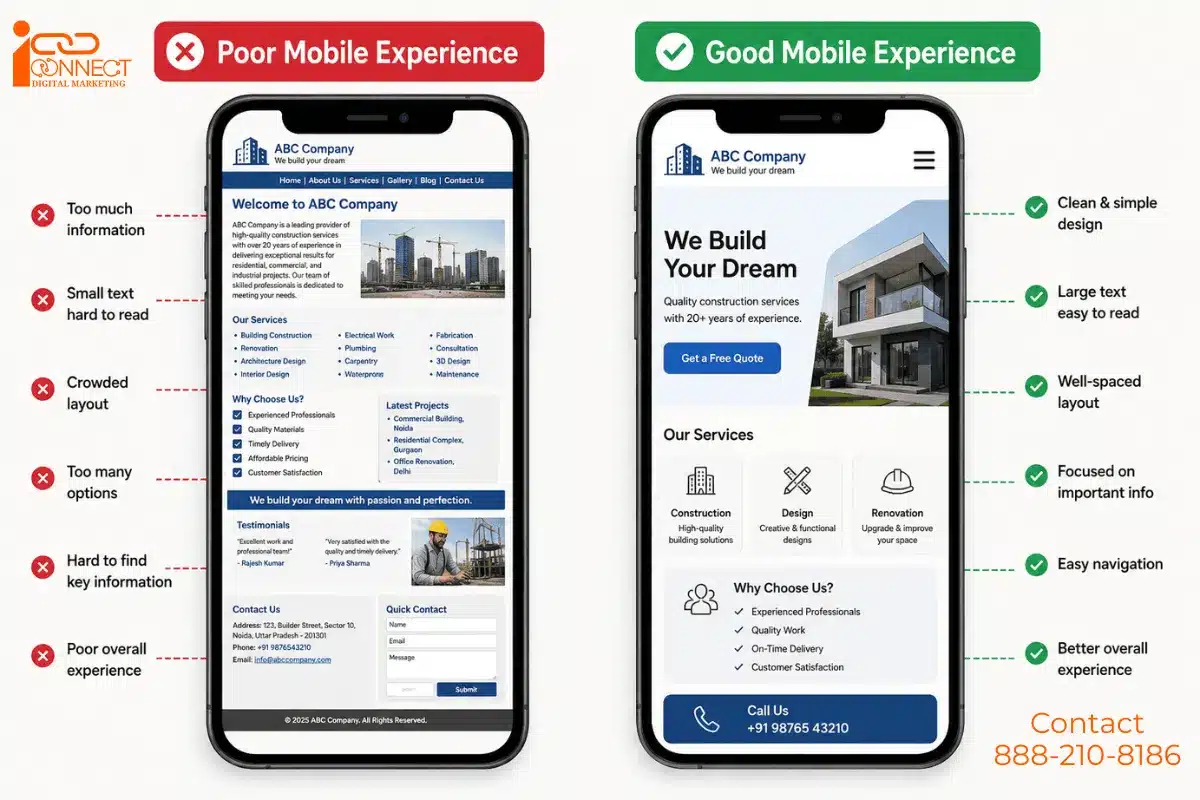
Step 6: Your Website Needs to Work on a Phone Properly
Most people aren’t opening your site on a laptop anymore. They’re scrolling on their phone, probably while doing five other things.
Because Google gives more preference to your mobile site than the desktop one. It’s called mobile-first indexing. Poor performance of your site on mobile will impact the ranking of your site even if your desktop version works great.
Step 7: The Little Padlock Icon Matters More Than You’d Think (HTTPS Status Codes )
You’ve seen it, that small lock symbol next to a website address. That means the site runs on HTTPS, which basically keeps whatever data moves between you and that website private.
Google treats this as a baseline trust signal. Sites without it sometimes get flagged as “not secure” right there in the browser bar, and honestly, most people bounce the second they see that warning.
It also gives users a safer browsing experience. On the other hand, browsers may show security warnings when websites don’t use a secure connection, which can make visitors hesitate before continuing.
For example:
❌ http://example.com
✅ https://example.com
HTTPS helps protect the connection between the user’s browser and your website. It also helps build user trust and website security.
As an SEO beginner, you should understand these common ones:
- 200 – The page works normally and returns successfully.
- 301 – The URL has permanently moved to another URL.
- 302 – The URL has temporarily moved to another URL.
- 404 – The requested page does not exist at that URL.
- 410 – The page has been permanently removed.
- 5xx – The server encountered an error while processing the request.
Step 8: Dead Links and Duplicate Pages Quietly Hurt You (Fix Broken Links and Technical Errors )
A broken link is nothing but a useless link that goes to nowhere or an error page. It is troublesome for the website visitor and also not preferred by Google in wasting its web crawling resources on such links.
On the other hand, duplicate pages are a somewhat different trouble for SEO. When there are two pages of your website that convey the same content, then Google finds difficulty deciding which page should get ranked.
Duplicate content does not automatically mean that Google will penalize your website. However, unnecessary duplication can make crawling, indexing, canonicalization, and the consolidation of SEO signals more complicated.
Worth doing a cleanup pass on your site every now and then just to catch this stuff before it piles up.
Step 9: Use Canonical Tags
Canonicalization becomes important when multiple URLs contain the same or very similar content. A canonical tag helps indicate which version of a URL you consider the preferred or canonical version.
Sometimes, one web page can have multiple URLs.
For Example:
- example.com/running-shoes
- example.com/running-shoes?color=black
- example.com/running-shoes?sort=price
These URLs may show similar or related content.
Therefore, use a canonical tag to tell search engines which URL represents the preferred version.
For example: This is the correct way to make it
<link rel=”canonical” href=”https://example.com/running-shoes”>
“Use this URL as the preferred version of the page.” Canonical tags help search engines understand which URL you prefer when multiple URLs contain similar content.
Step 10: Monitor Technical SEO Regularly
We should alway regularly check and monitor technical SEO to prevent sudden drops in search rankings and traffic. On our website, we regularly add new pages, remove old pages, change links, update content, and make technical changes.
Therefore, we should always check our website regularly for:
- Crawl errors
- Indexing issues
- Broken links
- Speed problems
- Mobile issues
- Redirect problems
- Sitemap issues
- Security problems
Helping Google Understand Exactly What Your Page Is
Now here’s a bit more technical one – Structured Data. This is a short snippet of code that you add to your website. It helps search engines understand the type of information available on your website. It could be anything such as recipe, product, review or an event.
Visitors never see this code directly. But it can unlock those extra bits you see in search results, star ratings, cooking time, price, and so on. Small detail, but it makes your listing stand out from ten other blue links sitting right next to it.
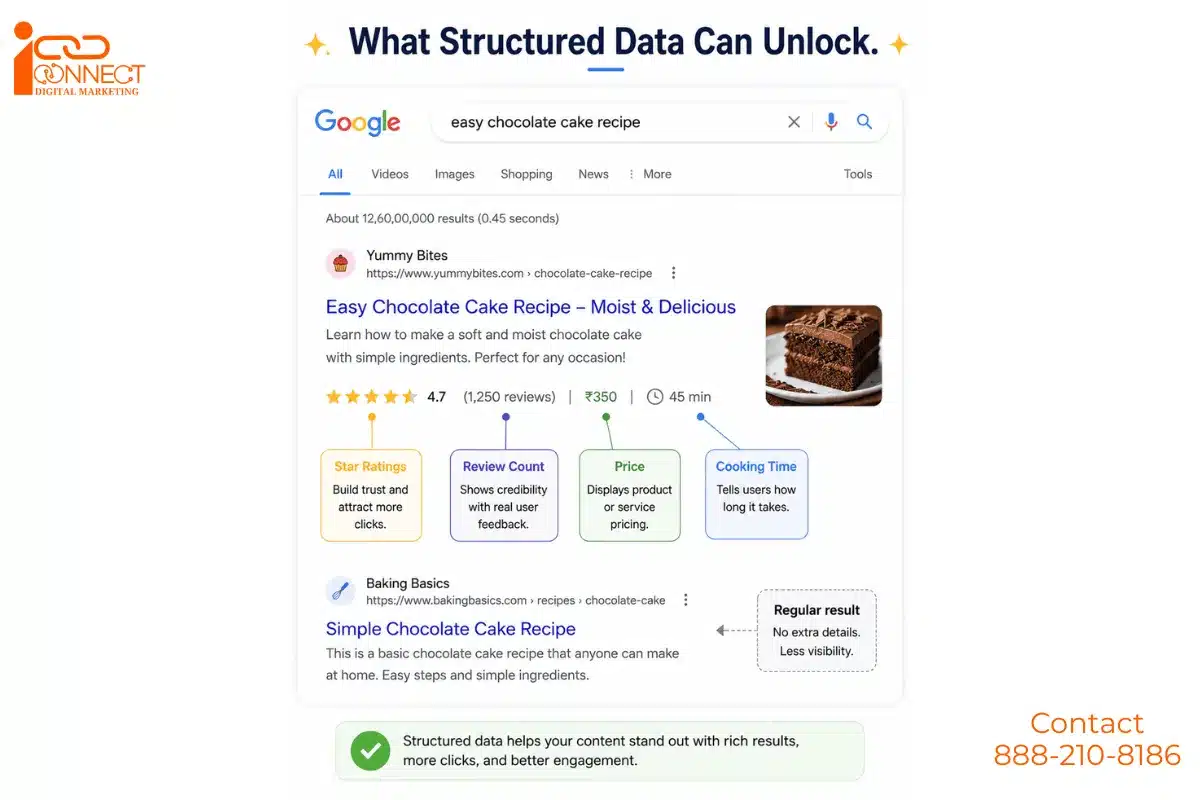
Structured data can help eligible pages qualify for enhanced search result features with additional information.
Technical SEO vs On-Page SEO vs Off-Page SEO
SEO has three major areas: Technical SEO, On-Page SEO, and Off-Page SEO. Each one focuses on a different part of a website and helps improve its visibility in search engines.
Technical SEO focuses mainly on the technical foundation of a website. It helps search engines crawl, access, understand, and index important pages.
On-page SEO focuses on the content and elements on individual pages, such as headings, search intent, topic coverage, title tags, meta descriptions, images, and internal links.
Off-page SEO focuses on activities and signals outside your own website, such as earning relevant backlinks, mentions, and building your website’s reputation.
In practice, all three areas work together. Great content needs a technically accessible website, while strong technical SEO cannot compensate for content that doesn’t satisfy the user’s search intent.
Quick Recap
Technical SEO never really gets talked about the way content or backlinks do, mostly because it’s invisible when it’s working right. You only notice it when it’s broken. But here’s the honest truth: you could write the single best article on the internet, and none of it matters if the page takes ten seconds to open or Google can’t even find it to begin with. A lot of SEO isn’t about doing more. It’s just about not tripping over your own feet.
Ready to Go Beyond SEO Basics?
Understanding Technical SEO is just one part of becoming a skilled digital marketer. Once you understand the technical side of SEO, the next step is to learn how SEO connects with content, social media, paid advertising, analytics, email marketing, and the overall digital marketing strategy.
For students and working professionals, learning these areas together can make it easier to understand how different parts of a digital marketing campaign work together.
In our Digital Marketing Course, you learn these areas through practical learning, including:
- 🔍 SEO and keyword research
- 🌐 Technical & On-Page SEO
- 🔗 Off-Page SEO and link building
- 📊 Google Analytics and Search Console
- ✍️ Content marketing
- 📱 Social media marketing
- 💰 Paid advertising
- 📧 Email marketing
- 📈 Website and campaign analysis
- 🎯 Digital marketing strategy
- 💼 Practical projects and case studies
The goal is not just to learn what digital marketing is, but to understand how different skills work together and how you can apply them to real websites, businesses, and marketing campaigns.
Learn the concepts → Practise the skills → Apply them to real projects → Build your digital marketing expertise.

Mohit Vij is the Founder & Digital Marketing Trainer at iConnect Digital Marketing Training Hub & Agency (iConnectDM), based in Ghaziabad. With over 9+ years of experience in SEO, Google Ads, Meta Ads, Social Media Marketing, Search Intent, Content Marketing, and Lead Generation.
Over the past years, He has trained hundreds of students, job seekers, working professionals in building successful careers in digital marketing while helping businesses improve their search rankings, website traffic, brand visibility, and lead generation. His insights are based on hands-on industry experience, continuous learning, and proven digital marketing strategies that deliver measurable results.