

To avoid common SEO mistakes and get your website ranking well on popular search engines like Google, you should know the basic concepts very well. Like, it requires more than just keyword-rich pages. Most importantly, the content of your website should be helpful for your users. Along with quality or user-friendly content, your website should be technically optimised for all devices like mobile, laptop, tabs etc.
Also, the website structure should also be good. Otherwise, if any of these areas are lacking, it will affect websites crawling done by search engines bots or crawlers to understand and rank your pages.
From my 9 plus years of experience in the digital marketing training industry, I know that there are many techniques involved in SEO. However, even if you have quality content in place but have a poor technical setup, poor internal linking or not matching content to what the user searched for then you will still face issues.
You may also be interested in: 👉SEO Course in Ghaziabad – Fees, Syllabus & Placement
In this guide, we will discuss what these common SEO mistakes are that you should be aware off before optimizing your website.
1. Missing or Not Understanding Search Intent
One of the SEO mistakes people frequently make is not understanding what searchers are looking for.
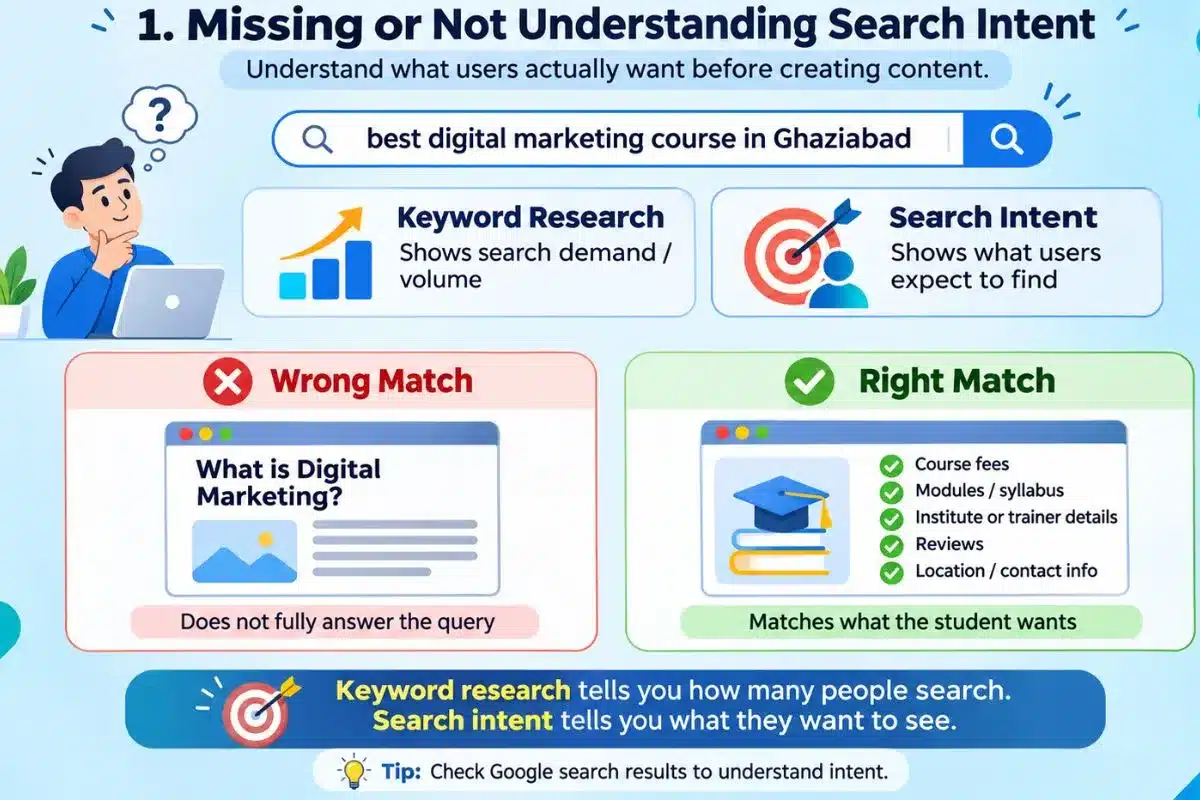
For Example, if any student searches for “best digital marketing course in Ghaziabad”. They will likely be looking to compare different courses, prices, modules and training institutes in Ghaziabad. However, an article explaining “What is digital marketing?” would not completely answer their query.
When conducting proper keyword research you should look at the search volume that google tool shows for your keyword by the help of Google Keyword Planner Tool. This helps you in providing search volume like how many students are searching for the particular keyword. “Keyword research helps us understand how many people are searching for a particular keyword, while analysing search intent helps us understand what those people actually expect to find.”
For example, if they want to compare then an information article may not be the best option. On the other hand, if they are looking for simple information then a sales page won’t be the solution.
As a digital marketing trainer, I always focus on training students by giving them proper knowledge on how important it is to know what the search intent is all about.
You may also be interested in: 👉Best Digital Marketing Training Institute in Ghaziabad – 2026
2. Ignoring Website Speed and Core Web Vitals
A slow loading website can cause user frustration and especially when users are browsing on mobile devices. In addition, Google uses Core Web Vitals to measure important elements of your page experience.
| Core Web Vital Targets | What it measures | Good target |
| LCP (Largest Contentful Paint) | Loading performance | 2.5 seconds or less |
| INP (Interaction to Next Paint) | Interaction responsiveness | 200 milliseconds or less |
| CLS (Cumulative Layout Shift) | Visual layout stability | 0.1 or less |
The following is Google recommendations for achieving a good user experience. However, achieving good Core Web Vitals scores does not automatically guarantee higher rankings.
Having an image banner, multiple animations and unnecessary plug-ins on your business website can slow down your site. However, your homepage looks nice and should load faster with any time of elements or animation used. Having too many elements on the page can make it slow.
For this reason, I would not only determine how quickly your website loads by opening the page up, but also look at the performance data from Google PageSpeed Insights. You can improve performance by compressing your images by using suitable modern image formats such as WebP, removing any unnecessary scripts and enabling browser caching.
3. Not Optimising Your Website for Mobile Users
A website which looks good on a desktop may not look great on a smartphone. Small text, text overlapping and hard to use menus and buttons can create a frustrating experience for users. This also contributes to SEO errors.
More importantly, Google will mainly use the mobile version of your site when it comes to indexing and ranking. Therefore, it is important to consider mobile optimisation as part of your SEO strategy from the beginning.
While conducting site audits and training I always try to highlight the importance of looking at how a website looks and works on mobile devices. For example, a training institute’s course information page may look neat on a computer, but the table showing fees may be too long to fit on the screen of a phone. As a result, this can cause confusion for visitors trying to compare courses or locate the enquiry button.
Use responsive design, simple menus and easy to press buttons. Additionally, try to also test important pages using different screen sizes to make sure visitors can easily navigate your site.
4. Using Keywords Too Often
Keywords help search engines understand your website content. However, using too many keywords of the same keywords can make your content appear forced. This is known as keyword stuffing and is also one of the common SEO problems.
When teaching students about SEO, it is always important to focus on how important it is to ensure that the keywords are included in the content naturally. Often beginners get caught up in trying to include too many keywords and forget to think about what the user would want..
Check from this sentence example:
“Our SEO company in Ghaziabad provides the best SEO services in Ghaziabad for businesses looking for an SEO company in Ghaziabad.”
The sentence repeats the same keyword unnecessarily and does not provide much useful information.
Instead of that sentence mentioned above, you could write:
“Our SEO services in Ghaziabad help businesses improve their website’s search visibility or ranking on Google.”
You need to make sure that your main keyword is naturally included throughout your content. Along with that, you should also include the secondary keywords where they are required. Include related (Semantic) keywords and variations, but do not try to include them in every heading. A good piece of SEO content should answer the question posed by the user rather than having an exact keyword density.
5. Publishing Duplicate or Very Similar Content
Duplicate content is when you have multiple URLs with the same (or very similar) content. As a result, it can cause issues for search engines to decide which one version should appear in search results or should rank.
In particular, this can be commonly seen on E-commerce websites using filter URL’s and also on local SEO pages on websites.
For Example: If you have separate service pages for services in Ghaziabad, Noida, and Delhi and you’re only changing the city name but leaving the rest of the content the same then there will be very little unique value within these pages. Therefore, this is an important consideration with local SEO. All of your location pages should provide value to the people who are visiting on those particular pages.
Duplicate content will not get your website penalised by Google. However, it can cause issues for your pages being indexed and canonicalisation issues and the correct pages being displayed. Keyword cannibalisation can also occur meaning that you have multiple pages targeting the same search intent.
Keyword cannibalisation is a related but different problem. It can happen when multiple pages on your website compete for the same search intent without serving a clearly different purpose.
To avoid these problems, you need to create unique pages if they provide value. Use canonical tags or redirects and look at pages that are similar.
6. Publishing Thin Content or Depending Too Much on AI
Increasing the number of articles on websites doesn’t necessarily generate organic traffic. Because the reader will move onto another website, if your content is not providing much value as what your user is looking for.
As AI can help you research, create outlines and write your content, without fact checking and providing any valuable insight your content will be quite shallow.
Having significant experience in digital marketing and training, I know that it is important to teach students how to provide value through their content for their readers. They should understand what they are writing about. Also they should fact-check their information like from where they have found that information. Also, if they are providing the information from their own insights or experience. AI should be used to supplement their knowledge rather than replace their understanding of the topic.
For instance, an AI tool may produce a general article about “What are Google Ads”. However, a useful educational article should also explain “How to set up your smart campaigns”. How you have chosen your targeted keywords. How relevant your ads are in terms of choosing the audience. The audience behavior and their interest. Also you should understand the clear difference between clicks and conversions. Otherwise, without this your article may not provide any value to someone looking to learn.
Google recommends providing helpful, reliable and people first content. Google guidelines on Creating Helpful, Reliable, People-First Content also suggest showing your personal experience, providing unique information and showing your knowledge of the subject.
Using AI Tools for writing content in your work is not an SEO problem. The main concern is publishing inaccurate, repetitive or low-value content, particularly when large amounts are created primarily to manipulate search rankings.
Fact check, provide valuable insights, avoid repetition and ensure any outdated information is updated. Ultimately, The aim is not to increase the amount of articles but to provide content that actually provides value to your readers.
7. Ignoring Title Tags, Meta Descriptions and On-Page SEO
The title of your page and your headings will help both search engines and users determine what your page is all about.
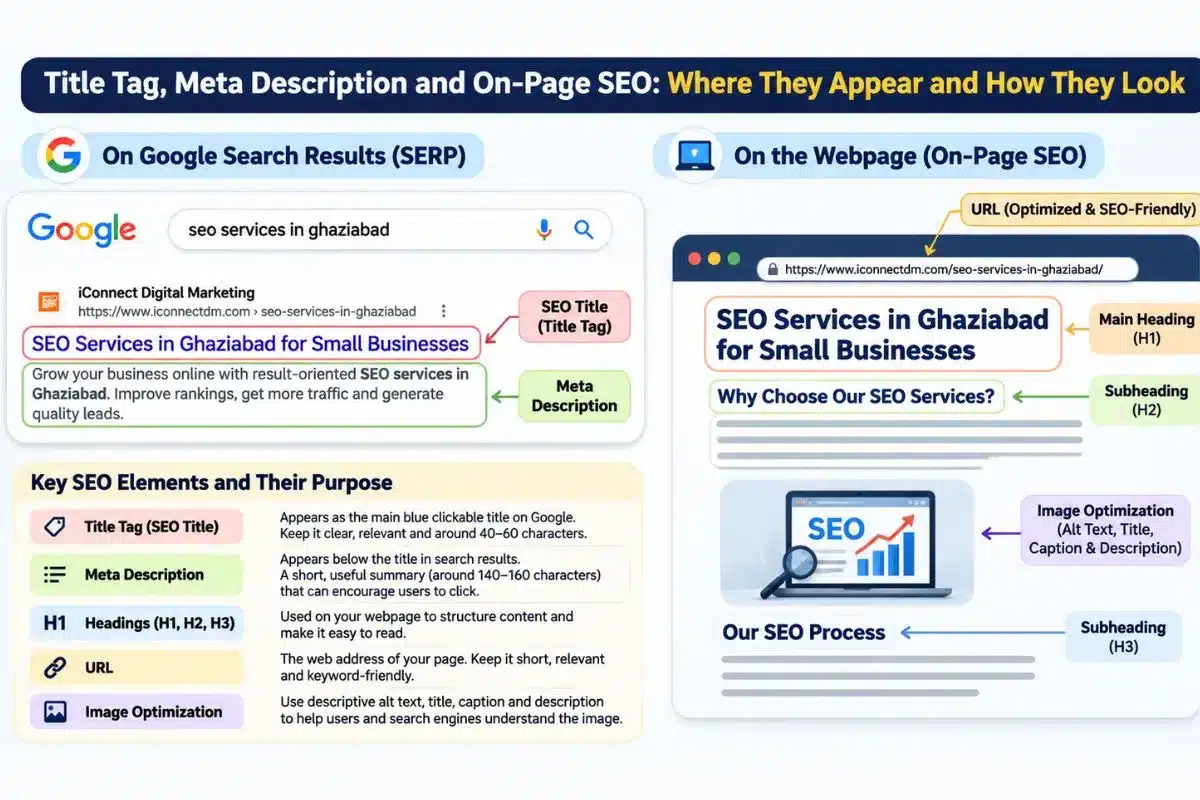
Clearly, the second title “SEO Services in Ghaziabad for Small Businesses” will give users more of an understanding of what your page is about, compared to just “Services”.
In my on-page SEO training, I always address to my dear students on how important it is for beginners to look at the whole page. Which includes the title, headings, optimized URL, image alt texts and proper formatting of the content.
Therefore, ensure you have unique titles which are written under 40-60 characters and should be eye-catchy like readers should click onto that SEO title. Always be clear with main heading, well formatted content using relevant H2 and H3 tags. Don’t forget to include descriptive image alt texts, title, caption, descriptions for proper image optimization. Meta descriptions are not a direct Google ranking factor. But a useful description in 140-160 characters may encourage users to click through when Google uses it as the search result snippet.
You may also be interested in: 👉 SEO Titles and Meta Descriptions: What They Are and How to Write Them
8. Blocking Important Pages from Search Engines
Sometimes useful content on your site will not be crawled by search engines. This could be because of incorrect robots.txt settings, accidental use of noindex and technical issues caused by a website redesign.
For example: If you have an important service page on your website with a noindex tag, users may still navigate to this page directly. But Google will not include that page in its search results once it has processed the directive.
Robots.txt and noindex are very different from each other. Robots.txt is about allowing crawlers to crawl your site whilst. Noindex is telling them not to include this page. Search engines need to crawl pages to see if there is a noindex tag.
It is also important to remember that search engines generally need to crawl a page to discover its noindex directive. Blocking the page through robots.txt may prevent them from seeing it.
To prevent such issues, check robots.txt, look at important pages to ensure they do not have accidental noindex tags. Additionally, using the tool URL Inspection in Google Search Console, submitting your XML sitemap to help search engines discover important URLs and checking if pages are being indexed after any website updates or redesigns. Always remember that submitting a sitemap does not guarantee indexing.
9. Neglecting Internal Links and Website Structure
Internal linking means, one link is connected from one page to another page within your website only. These help to provide users with additional information and provide search engines with more context about how your pages relate to one another.
For example if you have a blog post about keyword research, you might like to link to an appropriate SEO training page or useful guide. But if you don’t have a link to a course page within your article about SEO training, you could cause your users to leave the page.
Internal linking should be planned as part of your content strategy.
Google’s SEO Starter Guide recommends to ‘have a logical site structure with useful links with meaningful anchor text’. So link between related blogs and pages on your services. Make sure your links are working and avoid any unnecessary redirects.
Also avoid using any backlinks or link building schemes. Focus on gaining quality and relevant links.
10. Not Measuring SEO Performance
After producing content and implementing SEO changes it is also important to check how well things are performing. If you don’t do this then you could be wasting your time on pages that are unproductive.
During my digital marketing training at iConnectDM, I often explain that simply looking at the keywords that are ranking is not enough. You may have pages that rank highly but aren’t getting clicked on. Or your website could be getting traffic but not any enquiries or sales.
For example, if you’re getting 1,000 organic visits per month but not getting any business enquiries. This could be because you’re not getting the right people to your site. Or your landing pages could just not be encouraging people to take any action.
Looking at how your website is performing will help you. Using Google Search Console you can see how many impressions, clicks and queries are coming to your website. Whereas Google Analytics 4 will give you a clearer picture of how users are behaving, where they’re coming from and converting.
Check through these reports regularly to see which pages are not performing. Look for areas that you can improve. Most importantly link your SEO performance to your business objectives.
How to Identify Common SEO Issues on Your Website
Begin by performing a simple audit of your website using key tools:
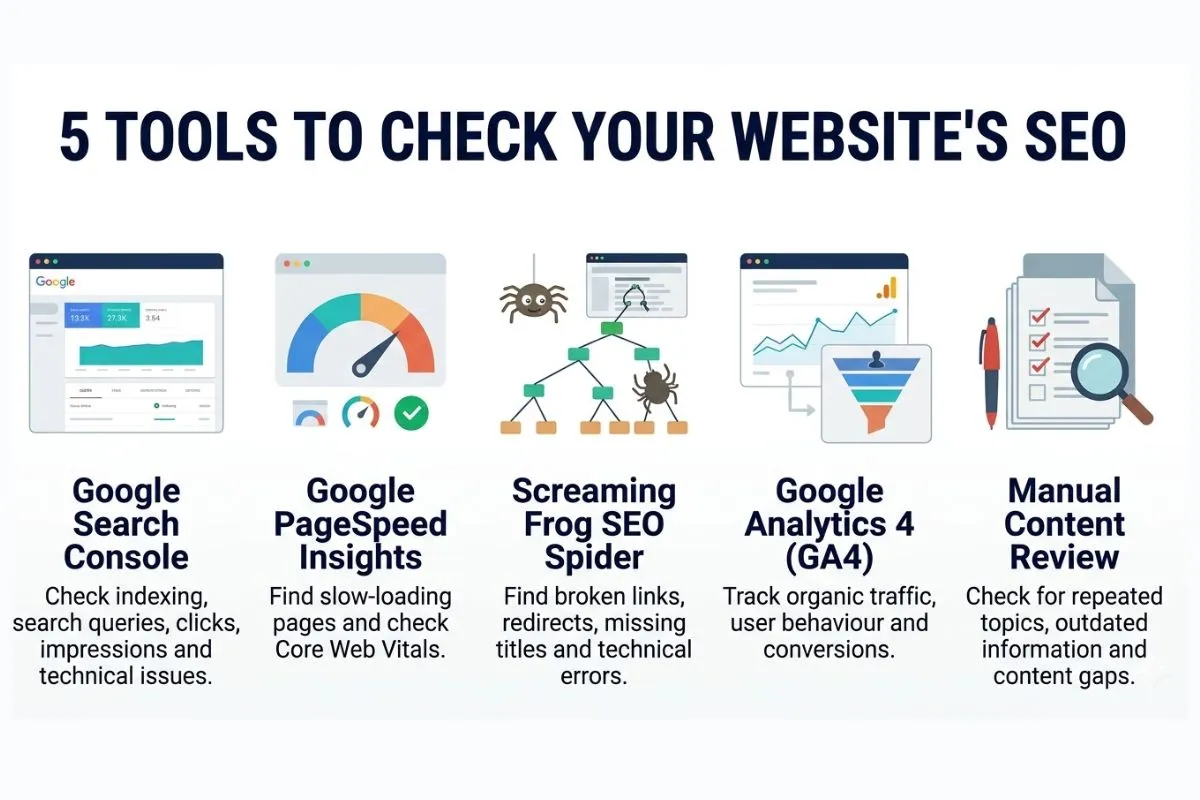
As a beginner, you can easily see which improvements are helping increase your traffic by fixing them one by one.
Conclusion
Overall, it is as important to avoid common SEO mistakes as it is to use the proper techniques. The failure to match search intent, poor quality of content, technical mistakes, and neglecting internal links may result in low visibility of the website.
Thus, you need to concentrate on relevant content, mobile-friendly experience, website structure, and periodic performance evaluation. After all, SEO requires patience, but persistent efforts will help to improve organic visibility.
Want to Learn How to Identify and Fix SEO Mistakes in Practice?
Understanding common SEO mistakes is useful, but learning how to identify and fix them on a real website is equally important. At iConnectDM, we provide hands-on SEO training in Ghaziabad on live client projects. Here our students learn SEO practically on topics like how to conduct SEO audits and identify technical issues on the website using various tools. How to improve on-page SEO of the website by understanding the search intent. Also, how to optimize website content and analyse search performance through practical exercises and live projects.
So, If you are looking to develop skills beyond SEO that can give you a new direction in your career, you can also explore our different courses and their modules. The training covers different areas of digital marketing, including SEO, Google Business Profile optimisation, content marketing, Google Analytics, social media marketing, paid advertising and the practical use of AI tools.
Our students learn digital marketing by not learning. Using proper google tools like Google Search Console, Google Analytics 4 and Google PageSpeed Insights to identify website issues, understand organic search performance and make informed SEO improvements.
To explore our courses and practical training approach, you can visit iConnect Digital Marketing Training Hub and Agency. You can also view our iConnect Digital Marketing’s Google Business Profile to check our business information, location, photos, and reviews shared on Google.

Mohit Vij is the Founder & Digital Marketing Trainer at iConnect Digital Marketing Training Hub & Agency (iConnectDM), based in Ghaziabad. With over 9+ years of experience in SEO, Google Ads, Meta Ads, Social Media Marketing, Google Business Profile Management, Search Intent, Content Marketing, and Lead Generation.
Over the past years, He has trained hundreds of Students, Graduates, Job seekers, Working Professionals in building successful careers in digital marketing and also helping businesses improve their search rankings, website traffic, brand visibility, and lead generation through various platforms. His insights are based on hands-on industry experience, continuous learning, and proven digital marketing strategies that deliver measurable results.