

Nowadays, having a website is not such a big deal. There are already millions of websites. All businesses trying to grab the same attention of users. Due to this, it was difficult for search engines such as Google to understand the key theme of your website despite your useful information. This is exactly where meta tags come into play. They are an important part of technical and on-page SEO and provide information about a webpage to search engines, browsers, and other platforms.
Meta tags refer to the small pieces of code that are inserted on your web pages. Actually, most of the visitors will never even notice them. But search engines do. They examine these tags carefully and base on them what your page is all about and how it should appear in the search listings.
It means that if meta tags are written in the right way, search engines will get a better picture about your site. Which of course can mean that the pages of your site might climb higher up in the search results. Better positions often bring more clicks. Over time, more clicks give your website a better chance to grow online.
Now let’s slowly break down. In this guide, we’ll explain the most important meta tags for SEO, how they work, and common mistakes to avoid.
You may also be interested in: 👉What Is Technical SEO and How to Do It?
What Are Meta Tags?
Meta tags refer to small texts embedded within the HTML code on any webpage. Meta tags might seem unimportant, but there is much going on behind the scenes. When Google bot or Bing bot visits your website, meta tags are one of the first things it checks to determine what the webpage is about.
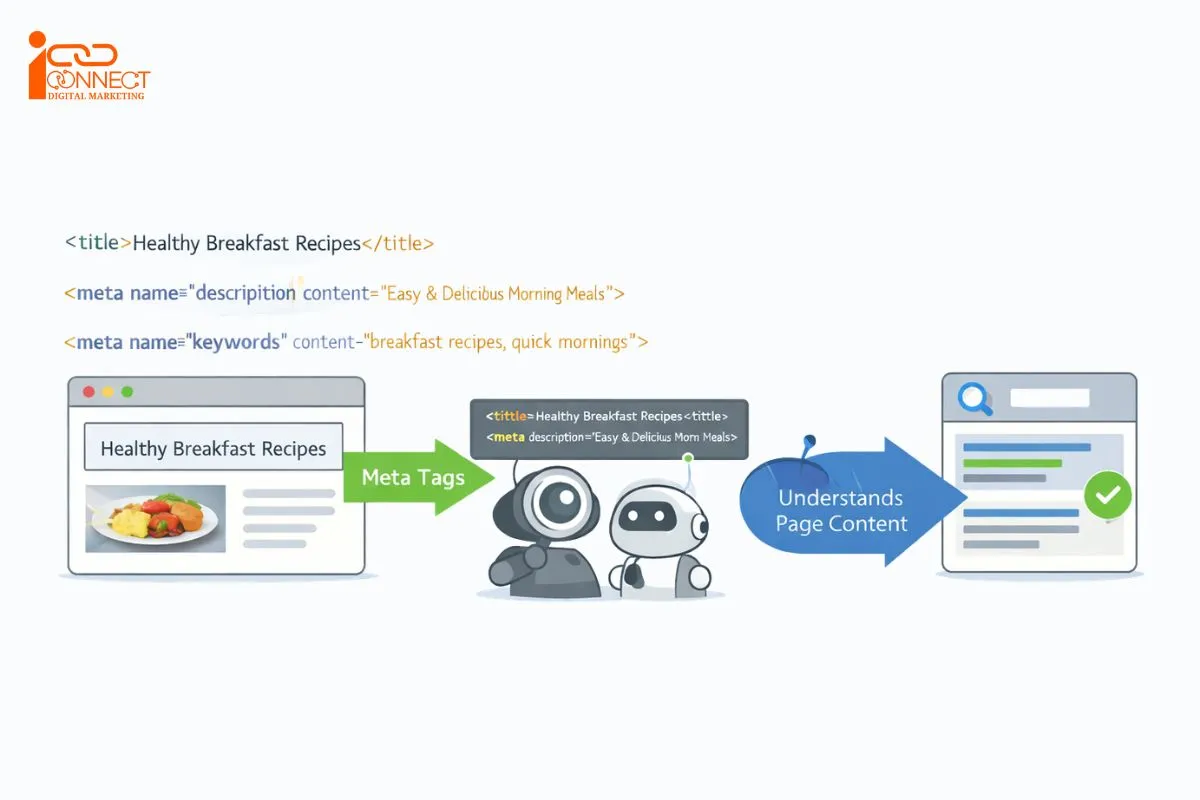
For instance, if your web page contains quick recipes for breakfast, and your meta tags have information related to break of fast ideas, Google understands your intention easily. As such, your web page will have an increased likelihood of being displayed for queries pertaining to break of fast.
<title>Easy Breakfast Recipes for Busy Mornings</title>
<meta name=”description” content=”Discover quick and easy breakfast recipes you can prepare on busy mornings.”>
Meta tags are placed within the <head> section of your website page. When a user visits your website, they are unable to see them. However, search engines can. Frequently, they are responsible for what your page’s title and description will look like in search results.
There are various meta tags. Every meta-tag does something just slightly different. There’s no need to try to commit it all to memory in one class. Now that you know what your top priority meta-tags will be, you can start the correction of your website. The HTML <title> element, for example, isn’t technically a meta tag, although it is routinely discussed alongside meta tags in SEO because of its importance to search appearance.
Why Meta Tags Are Important for SEO?
Meta tags may be tiny, but they are very hardworking. For one, meta tags help search engines figure out what your page truly pertains to. Meta tags that are incomplete and poorly written may end up confusing search engines and directing your page for irrelevant searches.
Google uses many systems and signals to determine which pages are relevant and useful for a particular search. A well-written title or meta description therefore doesn’t guarantee a better ranking.
Another big reason meta tags matter is clicks. Think about how you choose which result to click on Google. You usually read the title and description first. If they look clear and useful, you click. If they look messy or unclear, you skip. That’s exactly how users behave.
In fact, studies show that improving titles and meta descriptions can increase clicks by around 15 to 30 percent. (Source: Search Engine Journal – Meta Tags Statistics )
Meta tags also help users feel confident. Knowing what one is about to read tends to keep a person longer on the page. That’s good, since a lower bounce rate is something that search engines find appealing.
Types of Meta Tags and How to Use Them
1. Title Tag
The <title> element defines the page’s HTML title.
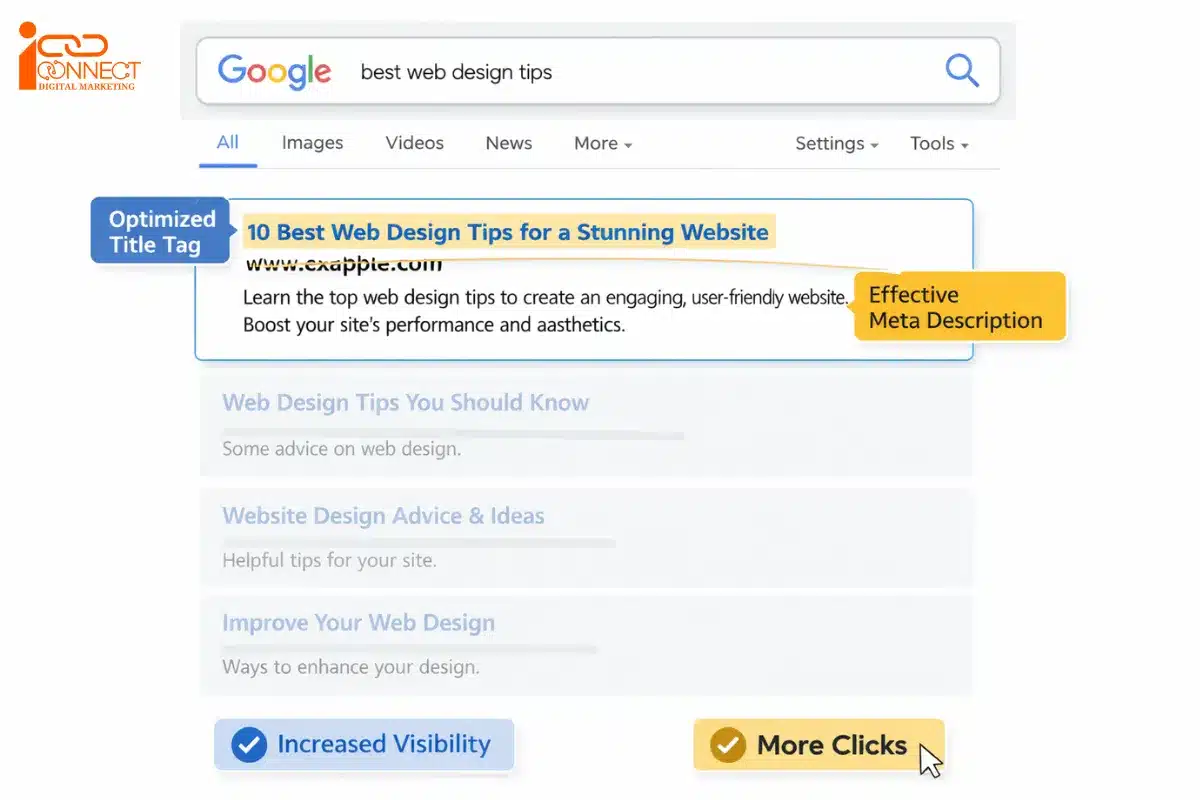
Example:
<title>Quick Breakfast Recipes for Busy Mornings</title>
Google can use the title element as one of the sources when generating a title link in its search results. However, the title you provide isn’t guaranteed to appear exactly as written because Google may generate a different title link based on information from the page and other sources.
An SEO title (which is also called a title tag) is the clickable title that search engines like Google display in search results and that appears in your browser tab. It is meant for both the search engines and the users to get an understanding of what the page contains.
How to Write a Good SEO Title
A good SEO title should be between 40-60 characters in length (or about 580–600 pixels wide) search engines do not cut them off and include your main keyword placed near the beginning of the title. While including keywords at the beginning enhances clarity and readability it should look natural and not sound like the usual search engine keyword stuffing garbage people expect.
Why it matters:
It directs both search engines and viewers to the nature of the page.
Simple tips:
- Accurately describe the page
- Be specific to that page
- Include the primary topic naturally
- Avoid keyword stuffing
- Avoid vague titles such as “Home” or “Page 1”
- Give searchers a reason to consider the result
Consider below example:
“Quick Breakfast Recipes for Your Busy Mornings”
This title is effective as it is short and clear from the first glance. One recognizes exactly what the page is about.
There are also plugins such as Yoast SEO and RankMath that you could utilize to ensure that your title is not too long and that SEO terms are not left out.
2. Meta Description
A meta description is the information shown below the title in searches when a result is displayed in a search engine result page.
Example:
<meta name=”description” content=”Discover quick and healthy breakfast recipes you can prepare on busy mornings.”>
The important word here is “may.” Google may use a meta description when creating the snippet displayed below a search result.
Google frequently generates snippets from the actual content of a webpage when it believes that content better answers a user’s specific query. Therefore, writing a meta description doesn’t guarantee that Google will display it.
Why it matters:
It doesn’t directly affect rankings, but it strongly affects clicks. To write a good meta description should typically be around 150–160 characters long (or roughly 900–920 pixels wide) to reduce the chances of being cut off in search results.
Simple tips:
- Keep it around 150–160 characters
- Use keywords naturally
- Add simple action words
- Accurately summarize the page
- Match the user’s likely search intent
- Include important terms naturally
- Give useful information rather than generic promotional text
- Be unique when practical
- Avoid misleading or clickbait language
There is no universal rule requiring every description to contain exactly 150–160 characters.
Google can truncate snippets based on the device, query, and available space. Focus on communicating the most important information early instead of targeting an exact character count.
You may also be interested in: 👉What Is Search Intent in SEO and Why Does it Matter?
Example:
Discover how you can prepare 10 healthy breakfast dishes in just 15 minutes or less in terms of preparation time.
According to Moz, by optimizing meta descriptions, the click-through rate is able to be increased by a large percentage of 30%, resulting in greater user awareness in the result listings. (Source: Moz)
3. Meta Keywords
Meta keywords were used years ago to list keywords for a page. The meta keywords tag looks like this:
<meta name=”keywords” content=”SEO, meta tags, search optimization”>
Current situation:
Most search engines ignore them now. This tag has a long history in SEO, but it is no longer useful for Google Search rankings. Google doesn’t use the keywords meta tag for web ranking.
Advice:
You can skip this tag. It does not help SEO anymore.
4. Robots Meta Tag
Robots meta tag—tells search engines on how to crawl and index the page. The meta keywords tag looks like this:
Let’s see below example:
<meta name=”robots” content=”index, follow”>
You can use no-index for pages like thank-you pages, admin pages, or duplicate content—that you don’t want in search results. The no-index directive tells supported search engines not to show that page in their search results after they crawl and process the directive.
5. Open Graph (OG) Meta Tags
Open Graph tags control how your page looks when shared on social media.
Examples include:
<meta property=”og:title” content=”Quick Breakfast Recipes”>
<meta property=”og:description” content=”Easy breakfast ideas for busy mornings.”>
<meta property=”og:image” content=”https://example.com/breakfast.jpg”>
Why it matters:
A good title and image make people more likely to click when your page URL is shared.
Common OG tags include:
- og:title
- og:description
- og:image
- og:URL
- og:type
OG tags don’t help rankings directly, but they do help bring traffic from social platforms. Interestingly, Google can use og:title as one of several sources when generating title links, so maintaining accurate Open Graph information is still worthwhile.
How to Optimize Meta Tags Step by Step
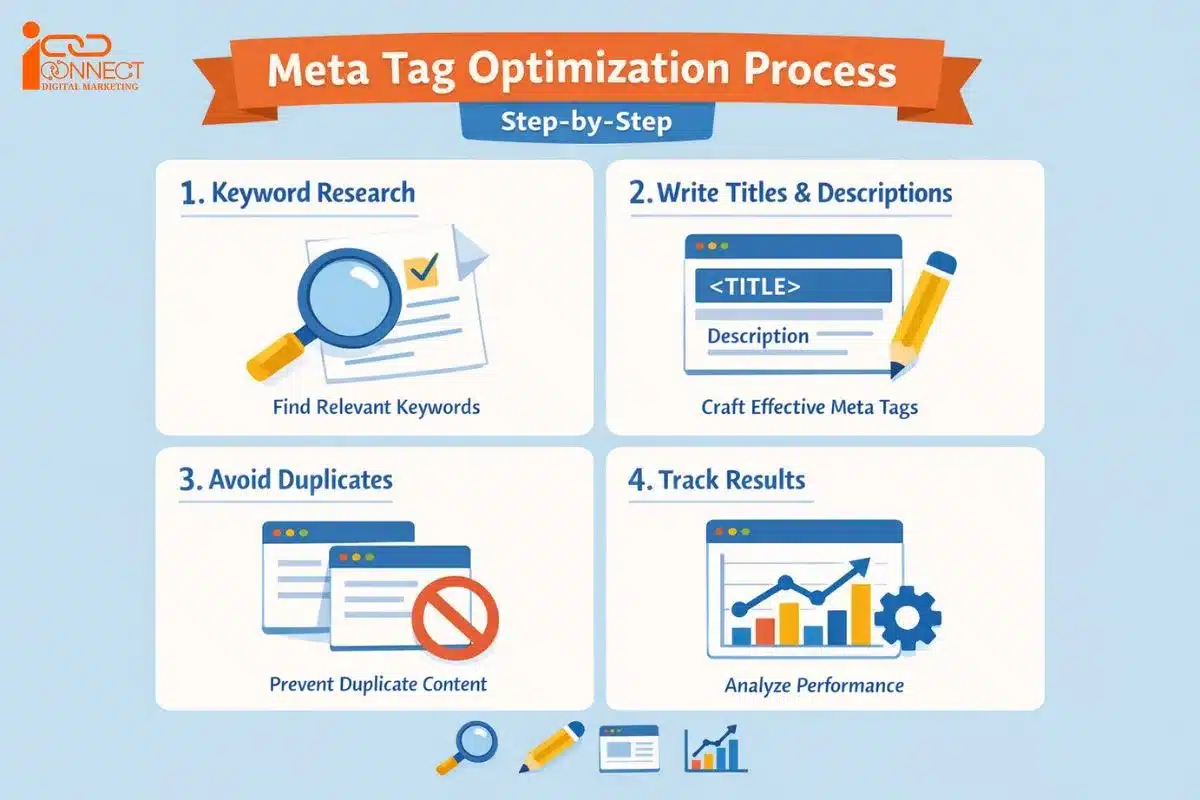
Step 1: Keyword Research
Prior to writing meta tags, you must know what people are looking for. Putting up meta tags based on guessing certain keywords will not give you a satisfactory result.
Use tools like:
- Google Keyword Planner
- Ubersuggest
- Ahrefs
Instead of going for extremely generic terms like—”SEO tips,” for instance, it is better to aim for something like—”SEO tips for beginners” or “how to improve website SEO.” This is likely to have a better chance of targeting their intentions.
Step 2: Make Titles and Descriptions Page-Specific
After identifying your keywords, avoid automatically giving every page the same title or description.
For example, an SEO website might have separate pages titled:
- Technical SEO Checklist for Beginners
- How to Write SEO-Friendly Title Tags
- What Is a Meta Description?
- How to Use Robots Meta Tags
Each page serves a different purpose, so its title and description should reflect that purpose.
Step 3: Do Not Repeat Meta Tags
Every webpage must have different titles and descriptions from one another. When numerous pages use identical meta tags, search engines become puzzled.
Duplicate tags lower rankings and visibility. Product pages, blogs, and service pages all have to be clear about their own contents.
Step 4: Monitor and Enhance
The task of meta tags is not over just because you have written them.
Use Google Search Console (GSC) to monitor impressions, clicks, and CTR for your blogs.
If a webpage is getting impressions but few clicks, consider changing—title or description. Minor changes can bring better results in the long run.
Examples of Good Meta Tags Information
Suppose you have an article teaching beginners how to practice yoga at home.
Example 1:
Title: “Simple Yoga Poses for Beginners at Home”
Description: Easy Yoga Poses to relax and stay healthy by all age groups with simple instructions to help you get started.
Example 2:
Title: “10 Ways to Spend Less on Your Trip”
Description: Learn practical ways to reduce accommodation, transport, food, and activity costs while planning your next trip.
These examples work because they are clear and focused. Again, the description tells users what they can actually expect from the page.
Beginner Tips for Meta Tags
- Do not try to update your whole website at once.
- Start with one important page.
- Use words people actually search for.
- Check results after one week.
- Always ask yourself: Would I click this?
Free Tools to Create and Check Meta Tags
If you use WordPress or another CMS, SEO plugins and built-in SEO settings can make the process easier.
Some common tools include:
- Yoast SEO
- RankMath
- Google Search Console
- Online Meta Tag Generators
- Google Search Central
Frequently Asked Questions
Q1: What is a meta tag in SEO?
A meta tag is a few lines of HTML code embedded into a webpage. This tells search engines what the page is about so it can, in some way, help Google get the gist of the content before it ranks it in search results.
Q2: Are meta tags necessary in SEO?
Of course, meta tags are very useful. They instruct search engines how to index the webpages correctly. Moreover, relevantly written meta tags increase the click-through rates with descriptions that make more sense to people reading them.
Q3: Can beginners use meta tags successfully?
Yes, meta tags should be no problem for beginners. In fact, even simple and clear title and description creation will already be enough to start with. At the beginning, no deep knowledge in SEO is required.
Q4: In how many characters should a meta description be?
Ideal meta description would be around 150-160 characters long. This would ensure that the entire description is visible in the search result page itself. In cases where this description is short or long, it might not be visible.
Q5: Are meta tags by themselves sufficient for enhancing page ranks?
No, meta tags are not on their own a guarantee that you will rank higher. It is part of the SEO toolbox. But there are a number of factors that affect this.
Conclusion
Meta tags are small, but they matter more than people think. They help search engines understand your content and help users decide if they want to click.
You don’t need to be an expert. Start with one page. Write a clear title and description. Test it. Improve it. Over time, your pages show up more. Traffic grows. The site performs better.
Small steps with meta tags really do add up. Finally, monitor performance in Google Search Console rather than relying on assumptions.
Good SEO isn’t about filling in every possible meta tag. It’s about using the right elements for the right purpose and giving both users and search engines clear, accurate information.
Want to Learn SEO and Meta Tag Optimization in Practice?
Understanding meta tags in SEO is easier when you apply those SEO techniques onto live client projects in learning. If you want to move beyond SEO theory and develop practical skills, iConnect Digital Marketing Traning Hub and Agency provides hands-on SEO training in Ghaziabad, where students can learn concepts such as keyword research, search intent, title tags, meta descriptions, on-page SEO, technical SEO, and performance analysis through practical exercises and live projects.
If you want to develop skills beyond SEO, you can also explore our Digital Marketing Course in Ghaziabad. The training covers different areas of digital marketing, including SEO, Google Business Profile optimization, content marketing, analytics, social media marketing, paid advertising, and the practical use of AI tools in digital marketing.
Students can apply these concepts to understand how websites are optimized for search engines, how search performance is measured using tools such as Google Search Console and Google Analytics, and how SEO fits into a broader digital marketing strategy.
To explore our courses, training approach, visit iConnect Digital Marketing Training Hub and Agency. Students considering training with us can also view iConnect Digital Marketing’s Google Business Profile to check our business information, location, photos, and reviews shared on Google.

Mohit Vij is the Founder & Digital Marketing Trainer at iConnect Digital Marketing Training Hub & Agency (iConnectDM), based in Ghaziabad. With over 9+ years of experience in SEO, Google Ads, Meta Ads, Social Media Marketing, Search Intent, Content Marketing, and Lead Generation.
Over the past years, He has trained hundreds of students, job seekers, working professionals in building successful careers in digital marketing while helping businesses improve their search rankings, website traffic, brand visibility, and lead generation. His insights are based on hands-on industry experience, continuous learning, and proven digital marketing strategies that deliver measurable results.