


LinkedIn is a widely known popular platform to find clients and clients who look to hire an agency for their work. In other words, you can say it is a direct opportunity for everyone to get high-quality clients on Linkedin.
It is not only a professional networking website. It is considered the top social media platform widely recognized as the most powerful tool in B2B marketing ever. In August of 2025 LinkedIn reported 1.2 billion members and 69 million companies in their database.
In addition to this, LinkedIn is a very effective platform for finding freelance clients in digital marketing. Unlike other search sites, LinkedIn provides opportunities like it allows you to communicate directly with business owners without anyone blocking your way.
However, finding clients requires a lot more than just sending connection requests. You need a professional working profile, samples of previous work done, and a clear approach to starting conversations.
This guide will show you how to set up your LinkedIn profile, find potential clients, and approach them professionally, even if you’re just starting your freelance journey.
You may also be interested in: 👉How to Find Content Writing Clients
1. Your First Steps as a Freelancer on How To Find Digital Marketing Clients on LinkedIn
Here is the exact journey you will follow from your very first login to closing a client.
Step 1: Set Up Your LinkedIn Account
To start with, once you are about to create your account use only your real name and a clear photo. You should not upload any casual party or vacation pictures on your profile. Doing that does not give good impressions on clients while visiting your professional dashboard. Secondly, write and use a simple headline that explains how you help businesses. For instance, do not use words like “Freelance Marketer,” focus on the final goal.
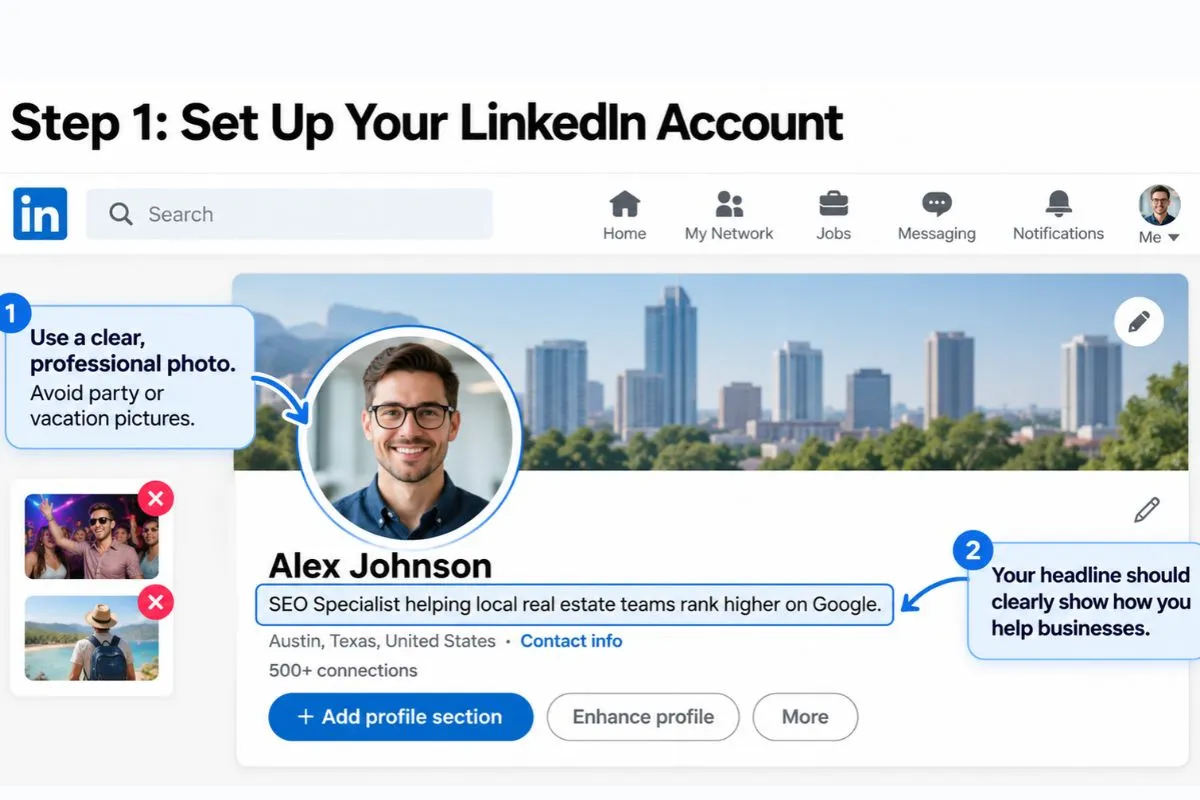
For example: Write: “SEO Specialist helping local real estate teams rank higher on Google.” This will give potential clients a clearer idea of your skills and the problems you can help them solve.
Step 2: Add Your Digital Marketing Services
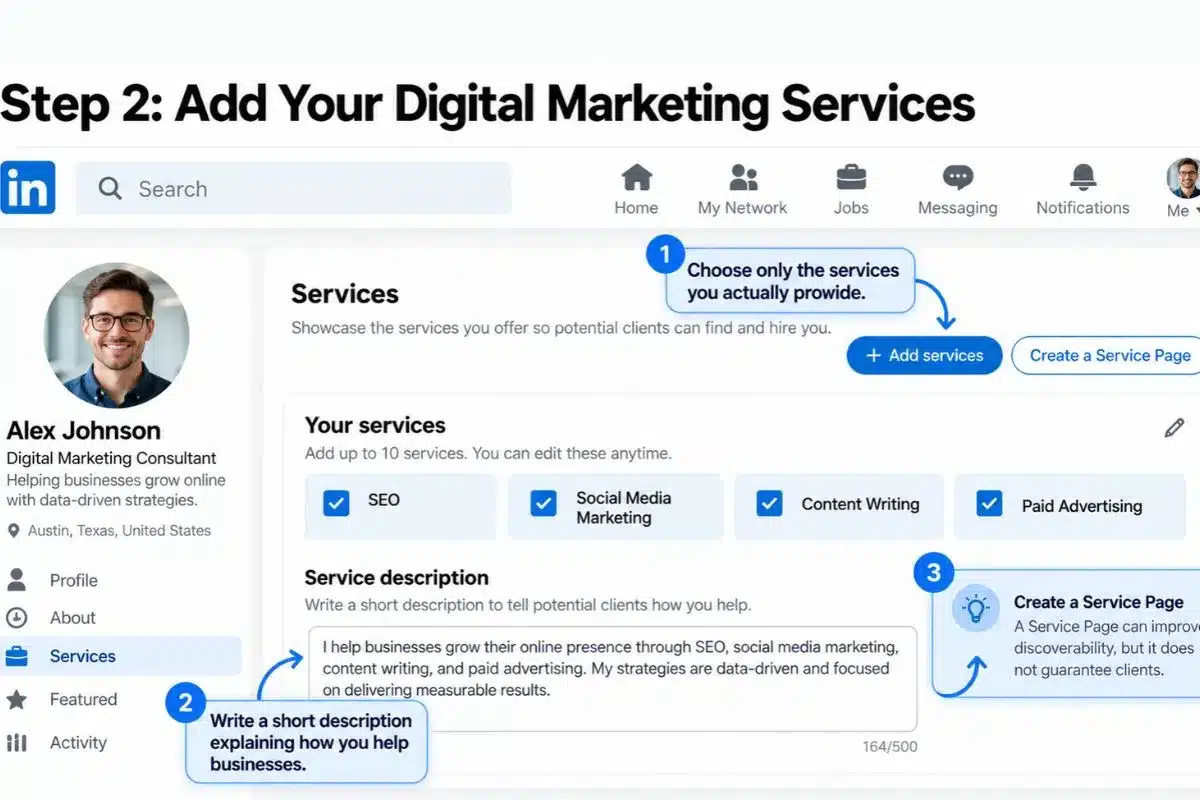
Second, go to your privacy settings and turn on Creator Mode to open up new features. In addition, fill out the “Providing Services” box on your page. This action places your name into LinkedIn’s internal directory. As a result, clients looking for help can find you easily.
You may also be interested in: 👉Freelancing Platforms to Find Digital Marketing Clients
2. Helpful LinkedIn Tools to Find Digital Marketing Clients On LinkedIn
Before you start messaging people, you must know how to use LinkedIn’s best features to find and connect with potential clients.
| LinkedIn Tool | What It Does | What You Need to Do |
| Search Bar Filters | Helps you find relevant business owners who buy services. | Search for terms like “Founder,” “Marketing Manager,” or “Agency Owner.” |
| Featured Box | Displays your portfolio and work samples on your profile. | Upload a link to your marketing work or writing samples. |
| Home Feed | Helps you share your marketing knowledge and interact with professionals. | Write short updates explaining successful business ads. |
| Job Tab Alerts | Helps you discover freelance and contract opportunities. | Set job alerts using terms like “Freelance Digital Marketer” or “Contract SEO Specialist.” |
| Direct Messages (DMs) | Lets you communicate privately with your connections. | Send short, helpful messages to your new connections. |
3. How to Set Up Your LinkedIn Profile
In the first place, you have to consider your profile page to be a store-like arrangement. The moment that a business owner clicks on your name, they must immediately understand how you could benefit him or her.
Write a Simple Summary
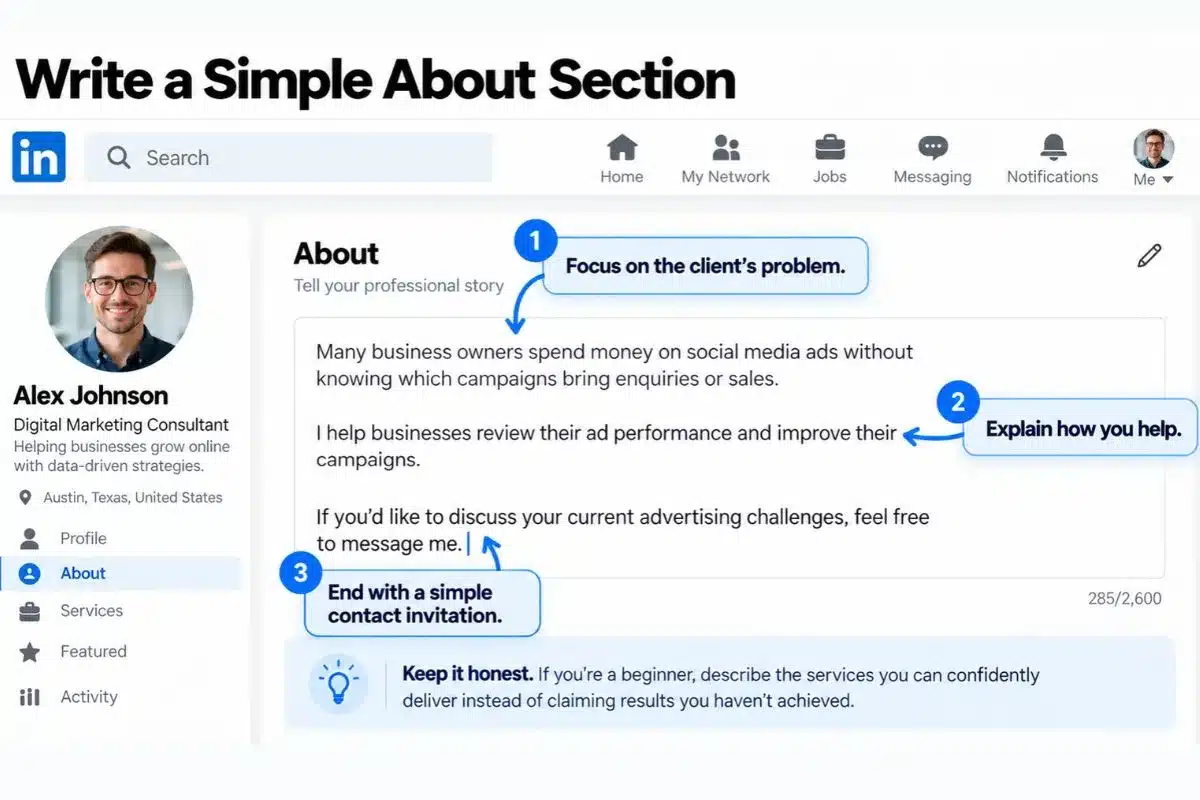
Do not write an essay regarding your biography. You should rather use your About Section to address the problems that your clients have.
- Plan: Find out a regular marketing issue, present your freelance work as the solution, and explain exactly how they can contact you.
- Simple Example: “Many business owners waste money on social media ads that do not bring in sales. I build simple ad campaigns that turn clicks into paying buyers. Message me today to check your current ads for free.”
Build a Simple Portfolio
Next, you need to show potential clients that you understand digital marketing. If you have no past clients, you can create a sample marketing audit of an existing brand or website.
- The Action Step: Write a brief two-page document checking a popular brand’s email plan. Point out what they do well and what they can fix. Finally, upload this document to your Featured Box so visitors can see your work.
You may also be interested in: 👉What to do When a Potential Client do not Reply
4. How to Attract Digital Marketing Clients on LinkedIn
Once your profiling is done, you have to start demonstrating your digital marketing skills to convince people to contact you first.
Share Useful Marketing Tips Regularly
To begin with, you need to post easy-to-read tips every day on your primary feed. For example, post an update with the title: “Why 90% of business websites don’t convert visitors into customers.” This consistent posting plan proves to your network that you truly understand digital marketing.
Leave Helpful Comments
Second, do not try to sell your services in public comment sections. Instead, choose ten business owners in your field and watch their updates. Whenever they publish a note, leave a friendly, helpful reply that adds good ideas to the conversation. As a result, they will click your name out of curiosity and view your profile page.
5. How to Find and Message Potential Clients Directly
Finally, you can move away from waiting for leads and use direct messaging to secure regular monthly income. Check out how to find digital marketing clients on LinkedIn.
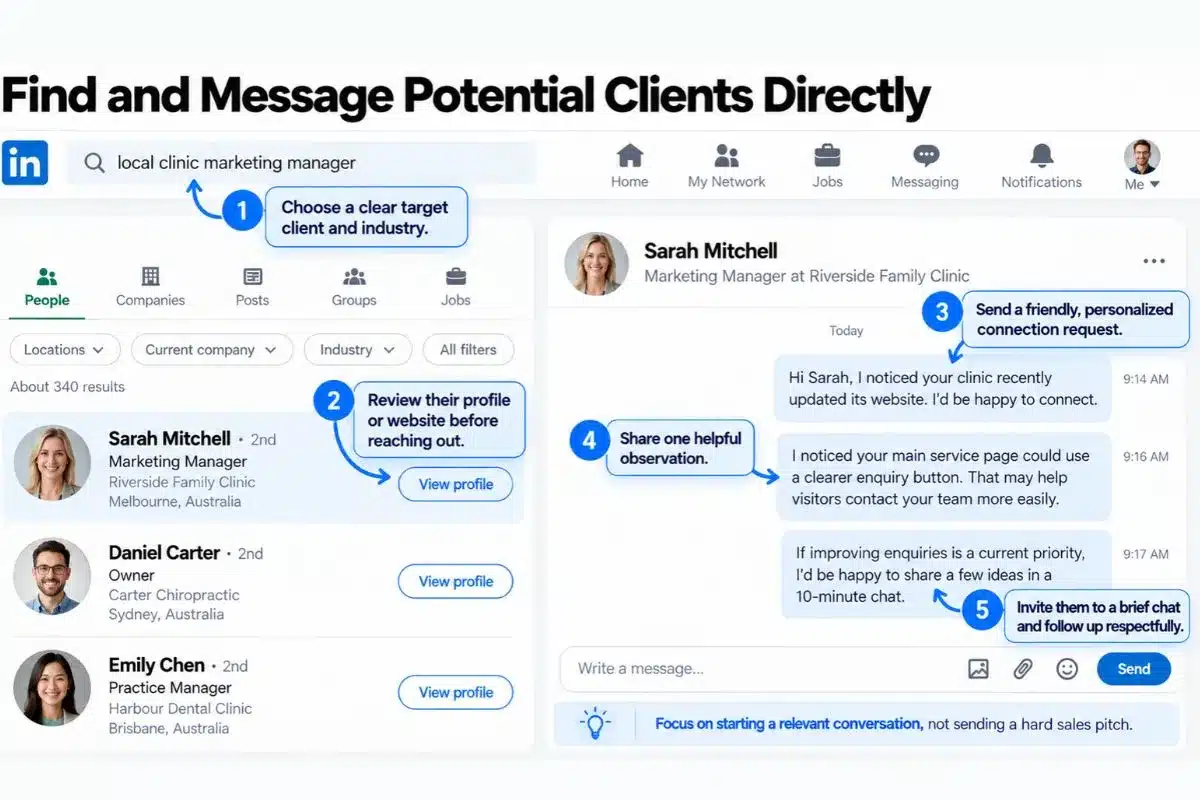
Use a Value-First Message Plan
Do not send long, boring sales texts that look like spam. Instead, try this easy path:
- Find Target Brands: Search for businesses that are hiring new workers or making more sales.
- Send a Friendly Connection Request: Connect with the marketing lead. Say: “Hi [Name], I noticed your team just launched a new product campaign. I loved the visual design. Let’s connect!”
- Give a Free Tip: Once they accept your request, wait two days. Then, send a short text message with a free tip. Say: “Hi [Name], I checked your website speed and found a small bug that might be slowing it down. Here is how your tech team can fix it quickly.”
- Ask for a Brief Chat: Close your helpful note by inviting them to a short talk. Say: “If you want to look at more ways to improve your digital marketing, let’s chat for ten minutes this week.”
To summarize, it is important to focus on being helpful in order to establish instant trust with busy corporate leaders. In turn, they will view you as an expert advisor and naturally choose to hire you for their marketing campaigns.
You may also be interested in: 👉How to Talk to Your First Digital Marketing Client
6. How to Turn a LinkedIn Conversation Into a Client
This is a very important part for how to find digital marketing clients on LinkedIn. When a potential client has agreed to have a conversation with you, you should keep focus on clearly understanding their business before giving your recommendations of your services.
First, always ask what they are looking to improve in the current situation. What marketing activities are they already using and what problems are they facing right now regarding this business.
For example, if someone wants more website enquiries, first understand where their visitors come from and how people currently contact the business.
Once you understand their requirements, explain what you can realistically help with. You can then discuss the scope of work, expected deliverables, timeline, and pricing.
If the client is interested, send a simple written proposal outlining what you will do and what it will cost. You should avoid promising specific rankings, leads, or sales that you cannot guarantee.
Final Thoughts
If one can learn the way to effectively optimize their profile, then looking for clients through social networking sites like LinkedIn will be relatively easy. For those who are new to LinkedIn, one should begin by understanding how this platform works. You should begin with learning how to use its searching opportunities. Finally, once you are able to communicate with the client, communicate with them in a professional manner and practice personalized outreach.
At iConnectDM, we focus on helping learners understand digital marketing through practical training on live client projects. Whether you are a student, working professional, or a Job seeker, you can explore our training programs to develop the skills needed to approach potential clients with greater confidence.
You may also be interested in: 👉How iConnect Digital Marketing is Shaping the Future of Digital Marketing Education in Ghaziabad

Mohit Vij is the Founder & Digital Marketing Trainer at iConnect Digital Marketing Training Hub & Agency (iConnectDM), based in Ghaziabad. With over 9+ years of experience in SEO, Google Ads, Meta Ads, Social Media Marketing, Google Business Profile Management, Search Intent, Content Marketing, and Lead Generation.
Over the past years, He has trained hundreds of Students, Graduates, Job seekers, Working Professionals in building successful careers in digital marketing and also helping businesses improve their search rankings, website traffic, brand visibility, and lead generation through various platforms. His insights are based on hands-on industry experience, continuous learning, and proven digital marketing strategies that deliver measurable results.