

Introduction
Email marketing may seem like just a simple process to many people. They assume that email marketing projects for students are only about writing a message and then sending it. In reality, a well-planned campaign is actually a long and complex task. Besides that, you need to figure out the perfect combination of audience, their stage in the buying cycle, their interests, and the right timing to get in touch with them.
Even when social media and video clips have become people’s favorite ways of passing the time, emailing remains one of the best ways businesses can communicate directly with their customers. It does not rely on the ever changing algorithms; that is why companies of all sizes keep using email automation for lead nurturing, sales, and customer retention.
Final Year digital marketing students will find email marketing a very valuable skill worthy of the time invested in it. Whether it is going to be placements, internships, freelancing, or your own business, practical email projects can demonstrate the ability to convert theory into actual marketing systems. The projects in this guide will assist you in acquiring those skills gradually, starting with basics and moving to more advanced automation.
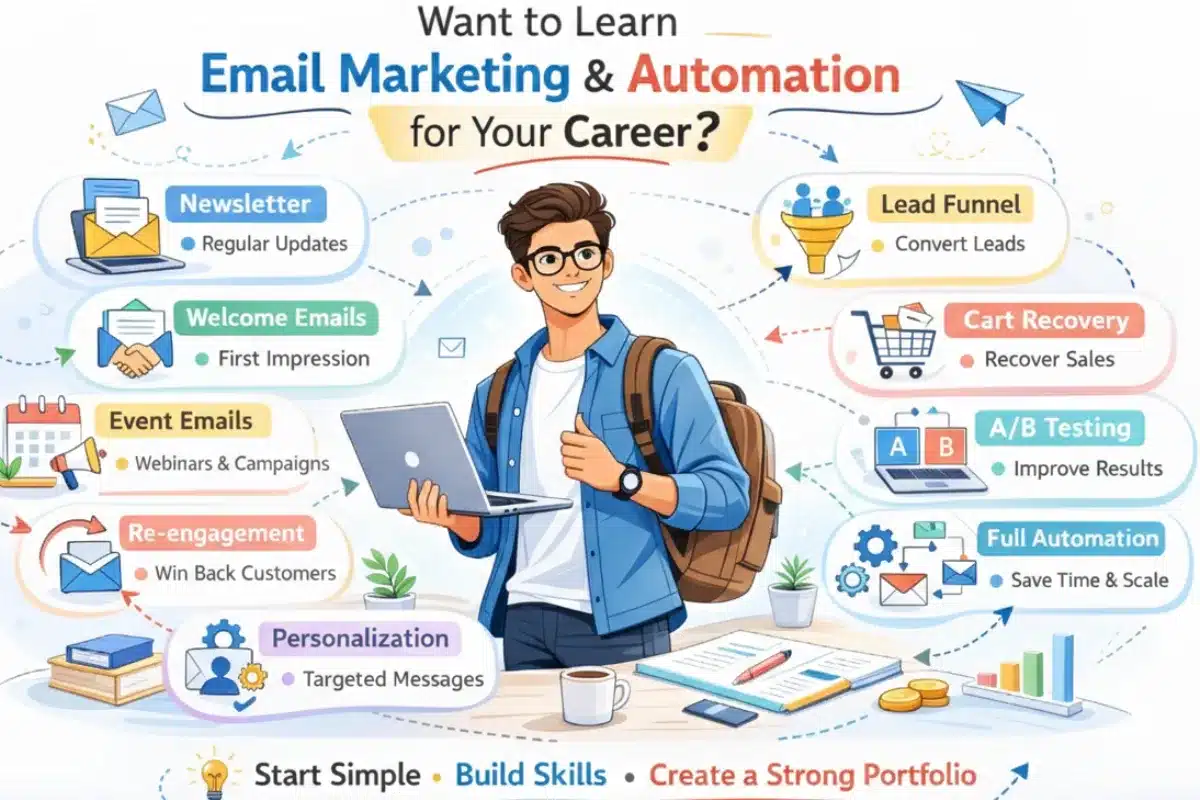
Essential email marketing and automation concepts that help students build practical skills and a strong portfolio.
You may also be Interested in: 👉 Best 25 Digital Marketing Project Ideas for MBA, BBA, and Final-Year Students
Why Email Marketing Matters for Digital Marketing Students
Learning Email Marketing is about much more than sending promotional messages. It helps students develop several core digital marketing skills that are applicable across multiple marketing channels. Some of these skills include:
- Understanding customer journeys
- Audience segmentation
- Marketing funnel creation
- Lead nurturing
- Conversion optimization
- Performance analysis
- Marketing automation
- Customer retention strategies
These skills are highly relevant in modern marketing roles because businesses increasingly rely on automation and personalized communication to engage customers.
For students preparing for internships and placements, practical email marketing projects can demonstrate the ability to create, manage, and optimize real marketing workflows. A recruiter may take you seriously when they see that your portfolio is full of real campaign workflows which means that you have been engaged with tools, triggers, and sequences not just classroom notes.
A portfolio containing completed email marketing projects can help students showcase practical abilities rather than simply listing email marketing as a skill on a resume. This can be particularly useful when applying for entry-level digital marketing roles, internships, freelance projects, or marketing assistant positions.
Best Free Email Marketing Tools for Students
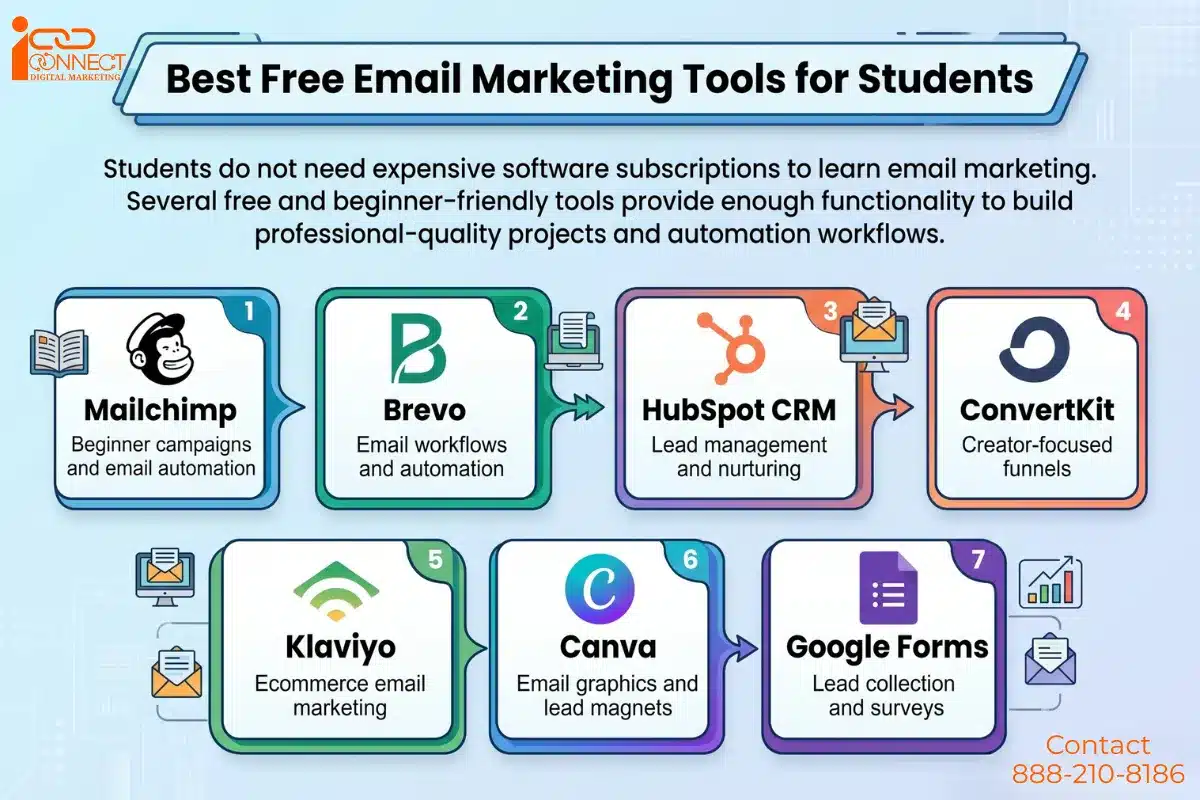
When selecting a tool, students should focus on understanding marketing strategy, segmentation, and automation logic rather than trying to learn every available feature. The principles learned on one platform can usually be applied to other email marketing tools as well.
Which Email Marketing Project Should Beginners Start With?
Students who are completely new to email marketing often benefit from building skills gradually instead of jumping directly into advanced automation projects. In order to create learning that is both structured and practical, these projects are designed with a four-level progression:
Level 1: Communication basics
Get started with a professional email structure and brand messaging.
- Newsletter Campaign
- Welcome Email Series
Level 2: Conversion & lead skills
Understand how email drives marketing objectives like signups, events, and purchases.
- Lead Magnet Funnel
- Abandoned Cart Recovery
- Event Promotion Campaign
Level 3: Strategic Automation (Creative Level)
Go for more intelligent lifecycle marketing and personalization.
- Preference-Based Re-Engagement
- Milestone Personalization Automation
- Waitlist-to-Launch Strategy
- Hypothesis-Driven A/B Testing
Level 4: Professional Capstone
Integrate and combine all the elements into one connected automation system.
- Full Customer Journey Automation
This stepwise method supports students in skill-building in a global and logical way without them randomly jumping from one task of the other.
10 Email Marketing & Automation Projects for Students
1. Newsletter Campaign for a Local Business
Objective
Understand how companies keep in touch with their audience on a regular basis.
What you should do
Take a small business for example a coaching institute, gym, cafe, boutique, or an online tutor. Your work will be to make a monthly newsletter that not only informs the customers but also keeps them engaged.
Implementation steps
The process begins with establishing a basic email list which needs to be divided into three basic categories: customers, enquiries and repeat buyers. Your email should start with a friendly greeting which will lead into your main content that includes updates and news followed by a single useful tip and short content piece until you reach a conclusion which presents the reader with their next action.
The email drafting process allows you to use Mailchimp and other similar tools. First send yourself a test email which you need to check on your phone. You need to analyze the opening and link clicking results after sending it to your list because this information will give you a basic understanding of its performance.
Tools
Mailchimp, Canva, Google Sheets
Skills gained
Structuring emails, communicating with customers, designing CTAs
Final outcome
An email template that can be reused and one campaign made with analytics.
You may also be Interested in: 👉What Is Google AI Mode and How Does It Work?
2. Automated Welcome Email Series
Objective
To discover how brands introduce themselves automatically to the new audience.
What you should do
Assume a person signs up for a course or a shop on the web. Prepare a short email series that greets the person and informs them about the following steps after signup.
Implementation steps
Compose three to five emails. The first will be sent out right away and it should be a thank you to the recipient. The second one after a day can be about the useful materials or the main products being highlighted. Third, after 3 to 4 days there can be testimonials or tips. Optionally, if you wish, you can add an email offering a consultation or a discount.
After setting the automation, the trigger should be the subscription, and then verify the flow with your own email address.
Tools
Mailchimp automation, HubSpot CRM (free), Brevo
Skills gained
Automation triggers, customer onboarding strategy, sequencing logic
Final outcome
A fully automated welcome that would work on its own once triggered.
3. Lead Magnet Email Funnel
Objective
You will understand how marketers gather leads and guide them through to a service or product.
What you should do
Offer an easy free resource like a beginner’s guide, a checklist, or a planner in exchange for email signup.
Implementation steps
Design the resource in Canva. Create a signup form and connect it to your email tool. The person who signs up should immediately get the resource. Send two extra emails: one with useful tips concerning the topic, and the other one softly suggesting a paid offer or consultation.
Tools
Canva, Mailchimp, Google Forms, landing page builder
Skills gained
Lead capture strategy, funnel building, nurturing communication
Final outcome
A fully functioning lead generation and nurturing system.
4. Abandoned Cart Recovery Campaign
Objective
Learn the strategy that e-commerce brands use to recover sales that were almost lost.
What you should do
Pick an idea for a mock internet store and write three, email sequences that will be aimed at customers abandoning their shopping carts.
Implementation steps
Send the first email within an hour that serves as a reminder to the user about their cart. A second letter is sent 24 hours after the first one, which focuses on the product’s benefits and therefore, the letter may contain something like customer reviews or a product guarantee. The third and final letter is sent 48 hours after the second to create an urgency, exclusive offer or discount.
Make sure that the messages of each include a visible checkout button as well as reference the product.
Tools
Shopify demo, Klaviyo, WooCommerce email plugins
Skills gained
Behavior, trigger automation, conversion writing, sales funnel logic
Final outcome
An authentic cart recovery workflow that can be used in a portfolio presentation.
5. Event Promotion Email Campaign
Objective
Learn about the event marketing role of email from invitation to follow-up.
What You Should Do
Choose an event like a webinar, workshop, or college seminar and develop the entire email communication cycle.
Implementation steps
Send an invitation email which contains the event details and the signup link. After this, you should send reminder emails which should be scheduled for one week before the event, one day before the event and one hour before the event. The thank-you email should be sent to participants after the event together with either a feedback form or a recording link.
Tools
Mailchimp, Eventbrite, Google Forms
Skills gained
Planning an event lifecycle, reminder automation, engagement messaging
Final outcome
A complete event promotion email sequence.
6. Preference-Based Re-Engagement Campaign
Objective
Re-engage inactive users and at the same time identify their preferences.
What you should do
You can make a re-engagement campaign for those subscribers who have not opened your emails for 60-90 days, however, it should also allow them to change their content preferences.
Implementation steps
Send a “We miss you” message along with a link to good content. Then put a simple survey asking how often people want to receive messages and about what topics. Afterward, send a thank you/ unsubscribe confirmation email.
Segment users based on vouchers for next campaigns.
Tools
Mailchimp segmentation, Google Forms, HubSpot CRM
Skills gained
Retention marketing, preference segmentation, audience insight collection
Final outcome
An intelligent re-engagement sequence that boosts both engagement and data quality.
7. Milestone Personalization Automation
Objective
Make use of the customer milestone as an occasion to trigger automation in a creative way other than just birthdays.
What you should do
Pick a milestone like signup anniversary, first purchase completion, or course progress checkpoint.
Implementation Steps
Draft a friendly congratulatory email which will recognize the customer’s achievement. The email should include a reward together with a suggestion and a helpful next step. Create automatic triggers which will activate specific date times or particular user actions.
Try out with a few users to check the timing.
Tools
Email automation tools (such as Mailchimp, HubSpot)
Skills gained
Lifecycle marketing strategy, personalization planning, automation timing
Final outcome
An email system based on milestones demonstrating a deeper understanding of customer relationships
8. Waitlist to Launch Email Strategy
Objective
Learn how modern product launches generate excitement around the products before they come out.
What you should do
Think of an imaginary product and plan a launch campaign that starts with accumulating waitlist subscribers.
Implementation steps
Build a waitlist signup page and a thank you email. Tease subscribers with a few pre-launch emails that reveal the product sharing hints/updates or give you a sneak peek into the development process. Once launched, surprise the subscribers with the product announcement email followed by an exclusive limited time offer for waitlist members.
Emphasize excitement and build up the product hype instead of going straight to selling.
Tools
ConvertKit, Mailchimp, Canva
Skills gained
Developing a pre launch audience, anticipation marketing, running segmented campaigns
Final outcome
A modern waitlist based launch funnel.
9. Hypothesis-Driven A/B Testing Project
Objective
Understand the concept of structured experimentation rather than random testing.
What you should do
Devise two versions of an email and run a test on one variable such as personalization, subject length, or CTA wording.
Implementation steps
Develop a well-defined hypothesis. Post that, send the two versions to two separate groups and check the results. Then, prepare a brief report with your conclusions.
Tools
Mailchimp A/B testing, HubSpot analytics
Skills gained
Marketing experimentation, performance interpretation, data reasoning
Final outcome
A testing report presenting analytical marketing skills.
10. Full Customer Journey Automation System
Objective
Integrate all the elements into a single professional lifecycle automation project.
What you should do
Develop a funnel covering the entire customer experience from — signup, engagement, promotion, to purchase simulation, feedback, and re-engagement.
Implementation steps
Design an entry point to signing up that is connected to a series of welcome emails. Throw in a few emails with product information followed by a promotional message. Simulate a purchase confirmation and feedback email. Add a re-engagement trigger if the user goes inactive. Draw the journey before implementing it.
Tools
HubSpot, ActiveCampaign, Mailchimp advanced workflows
Skills gained
Lifecycle strategy, automation architecture, funnel visualization
Final outcome
A highly functioning portfolio-level marketing automation system demonstrating the capability of real-world marketing.
What Recruiters Look for in Email Marketing Projects
Recruiters generally evaluate more than design quality. They often assess:
- Campaign objectives
- Audience segmentation
- Automation workflows
- Funnel structure
- Reporting quality
- Data interpretation
- Problem-solving ability
Projects that demonstrate measurable outcomes often make a stronger impression than projects that focus only on visual design.
You may also be Interested in: 👉10 Google Ads & PPC Project Ideas for Final Year Students
Typical Email Performance Benchmarks
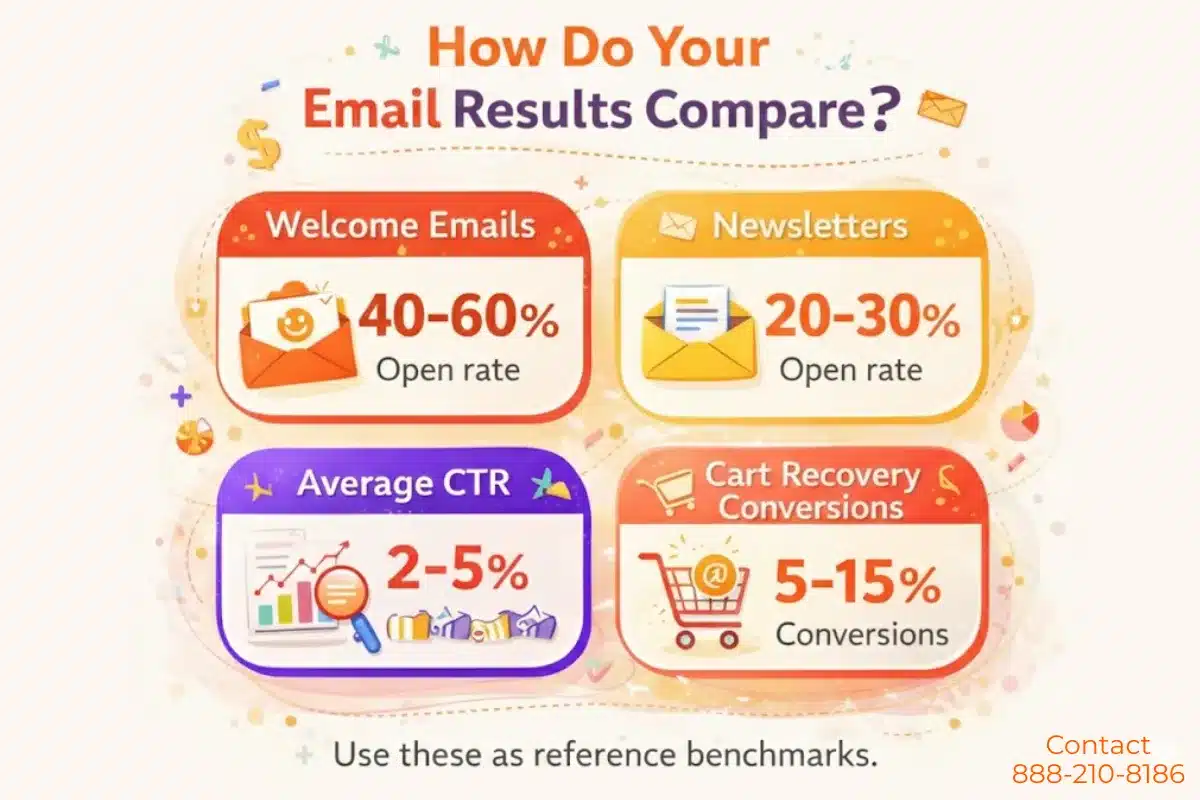
Students may use the figures below to compare their own results to standard industry averages:
Consider these figures as reference points only, but they help you judge if your campaigns are doing well realistically or not.
Common Mistakes Students Make in Email Marketing Projects
- Developing email designs with no definite campaign objectives
- Sending an excessive number of automated emails in a very short period
- Ignoring testing of the mobile layout
- Improper audience segmentation
- Neglecting to monitor open and click metrics
- Treating projects as if they are only theoretical rather than actual workflows
Avoiding these errors will present your work as professional and grounded in the real world.
Checklist of Email Marketing Projects for students
Students who want to strengthen their portfolio further can also explore other Digital Marketing Projects for Students. Before submitting your project, confirm:
- Clear objective defined
- Audience segment selected
- Email sequence created (3–5 emails minimum)
- CTA included in each email
- Mobile layout tested
- Metrics recorded
- Short summary report prepared
Conclusion
Ultimately, a big part of your growth as a digital marketing professional depends on knowing how to create and automate email campaigns. And truthfully, the best way to get this skill is not only through reading but by actually making real campaigns that you can showcase to others. The 10 marketing projects from the article provide you a sequential road map, beginning with the fundamentals and gradually advancing to more sophisticated automation. This will provide you experience as well as strong portfolio work.
So, take it one project at a time. Finish it properly, note down what you learned, and keep your results saved. By the time you graduate or complete your internship, you won’t just be able to talk about email marketing — you’ll be able to show real examples of what you’ve done, which makes all the difference.
👉 Join our “Digital Marketing Jobs | Courses | Updates | – iConnectDM-Ghaziabad” Whatsapp Group

Mohit Vij is the Founder & Digital Marketing Trainer at iConnect Digital Marketing Training Hub & Agency (iConnectDM), based in Ghaziabad. With over 9+ years of experience in SEO, Google Ads, Meta Ads, Social Media Marketing, Search Intent, Content Marketing, and Lead Generation.
Over the past years, He has trained hundreds of students, job seekers, working professionals in building successful careers in digital marketing while helping businesses improve their search rankings, website traffic, brand visibility, and lead generation. His insights are based on hands-on industry experience, continuous learning, and proven digital marketing strategies that deliver measurable results.