

 Digital Marketing Course
When people talk about SEO, you may hear the word schema markup. Sounds big, right? But it’s not. It’s actually very simple. What it does is that it tells the search engines what your website is all about.
In reality, it’s one of the simplest ways to reduce confusion between your website and search engines. Schema markup is structured data. It’s a way to tell search engines what your content represents, not just what words appear on the page.
As a result, without a schema, Google has to interpret your page on its own. Sometimes it gets it right. Sometimes it doesn’t. Schema reduces that guesswork. With it, they would be informed if it is a recipe, a product, or even an article. It simply makes things clear to them and helps your page show up better in the search engine results page. Schema does not improve rankings on its own. It only improves understanding.
Read | What is Search Engine Optimization and How It Works?
What is Schema Markup?
Schema markup is a standardised structured data format (from Schema.org) that helps search engines accurately classify content.
In Addition, Instead of guessing, Google gets clean and clear signals about:
- This Page is an Article.
- This Page is a Product Page.
- This Page contains frequently asked questions (FAQ’s)
- This Page describes a local business.
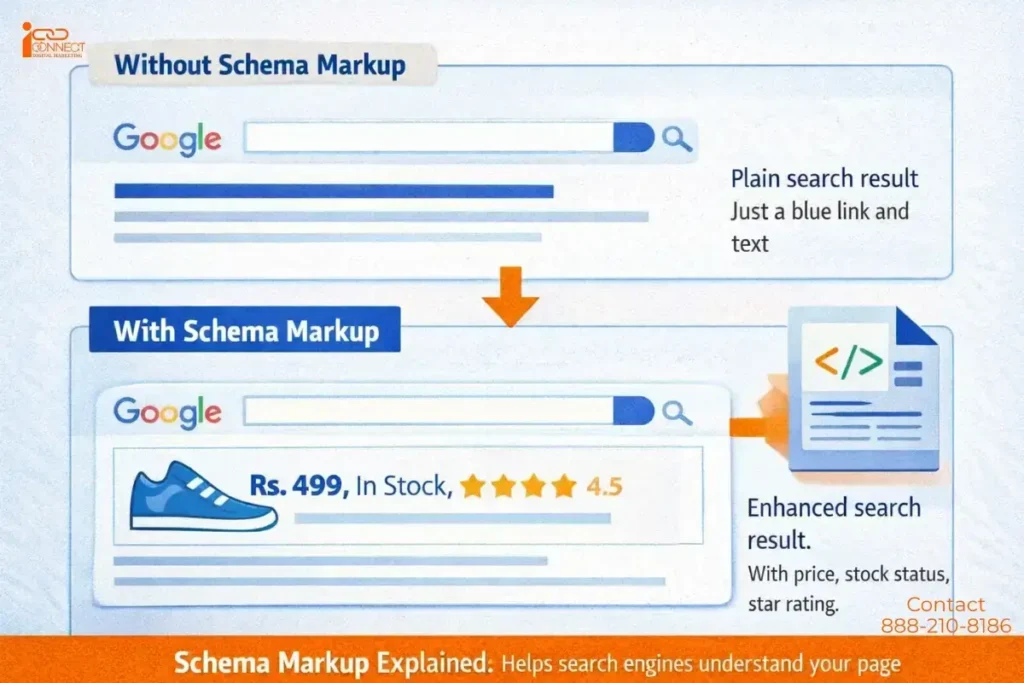
A Simple Example (Where Schema Helps — and Where It Doesn’t): Suppose you sell shoes on your website. Schema can inform Google what the price of the shoe is, whether it’s in stock, and what customers think about the product. Then, when users search for shoes, Google can display this extra information-such as “INR 499/-, In Stock, 4.5 stars”-directly in the search results themselves.
Honest experience:
I’ve implemented perfectly valid Product schema on pages that never showed rich results, while similar pages did — because Google prioritized brand trust and search intent over schema accuracy alone.
Schema enables eligibility. It does not guarantee display.
Fact Insight: Studies show that websites using schema markup appear with rich results in about 36 out of 100 searches. That means your page can look more attractive than a plain blue link. (Source: Sixthcitymarketing)
Why Schema Markup Matters for SEO
Search engines do not “read” the pages as humans do. They are basically based on patterns, signals, and context.
However, sometimes:
- A product page looks like a blog
- An FAQ looks like marketing content
- A local business page looks incomplete
Schema exists to remove puzzles. It helps search engines in ways:
- Classify your content correctly
- Display additional details (when they choose to)
- Understand relationships between entities (brand, product, author, location)
Important truth:
Schema helps understanding, not authority.
What Schema Actually Helps in SEO (And What It Doesn’t)
Additionally, we can look at a page and understand it easily. But search engines need signals like titles, keywords, and links. Sometimes these signals are not enough to explain the full meaning of a page.
Read | What is a Keyword in SEO?
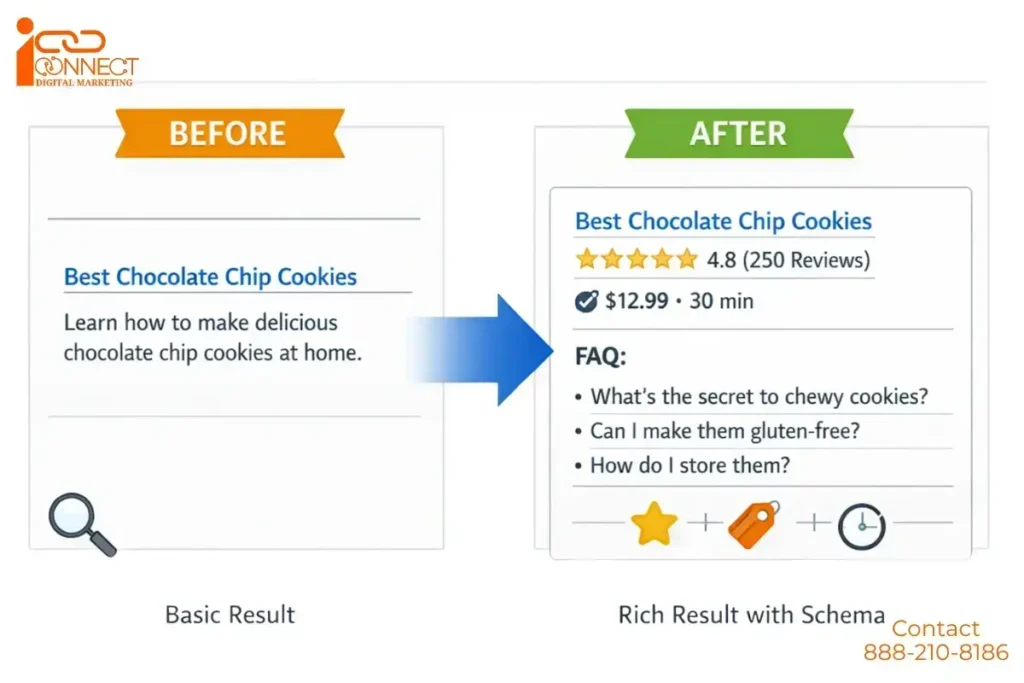
Thus, It provides the search engines with more information. Look at this example. Say you post a recipe. With schema, you can tell Google how long it takes to cook, what’s in it, how many calories, and even a rating. Then, when someone searches, Google can show all that info right under the title.
That’s what makes your page so different. Try to imagine two results for a search. One would show “Chocolate Cake Recipe.” The other would say “Chocolate Cake Recipe – 45 minutes, 200 calories, 4.8 stars.” The latter sounds more informative. A normal user would click on the second result without even hesitating.
Pro Tip: Don’t try to use all schema types at once. Start with simple ones like Article, FAQ, or Recipe. Even these can make a big difference.
What Schema Can Help With
- Rich results (ratings, FAQs, prices, dates)
- Improved search result display
- Well-defined content classification
- Voice Search Interpretation
- Accuracy of AI summarisation
What Schema Does NOT Guarantee with
- Higher rankings
- Rich results coming through
- Higher traffic growth rates
Many pages have proper schemas and do not display any rich snippets. This is completely up to Google.
Types of Schema Markup You Should Know
There are many schema markup types you should know. Some are general, and some are for special industries. Here are the main ones:
Core & Common Schema Types:
- Organization Schema: Used to describe a business or organization. Like Name, Logo, Contact information and social Profiles. Helps with knowledge panels and common for business, brand, and nonprofits.
- Person or Individual Schema: This particular schema describes a Person or Individual like Name, Job Title, Affiliation, social links. It is common for authors, executives and for public figures.
- Website Schema: This is used to provide information about your website. It enables website links search box and it is almost done for all websites.
- WebPage Schema: Typically used for describing a specific Page. It basically specifies the page type, like About us, Contact us, FAQ’s Page etc.
Content-Focused Schema:
- Article Schema: Used for blog posts or news. Shows author, date, and image.
Example: A blog on “Digital Marketing Basics” can show the author’s name, date, and thumbnail. - FAQ Schema: For question-and-answer pages. Google can show these directly in search results. Example: A page about “Google Sandbox” can show “How long does a Sandbox last?” in search results. Adding FAQ schema does not mean FAQs will appear in search. Google may ignore it if the page looks promotional or thin.
- How to Schema: It is used to verify step by step instructions. It includes images, tools and the time required. This is commonly used for tutorials and DIY Guides.
- Breadcrumb Schema: Very important it is which defines the page hierarchy or to say the list. This improves breadcrumb display in the search engine result pages. Also very common for large or structured websites.
Product or E-Commerce Schema:
- Product Schema: This one’s primarily used on e-commerce sites. It includes information on price, whether the product will be in stock, reviews, and ratings. They will be able to see this directly, like when you’re putting up shoes, and Google will display “Rs. 499, Available, 4.5 stars from 200 reviews.”
- Review Schema: Highlights customer feedback and star ratings. Builds trust and gets more clicks.
- Offer Schema: This is used for applying Price, Currency, Sales Dates inside the product.
Local & Event Schema:
- Local Business Schema: It is used mostly for shops, cafes, or restaurants. What it basically does is that it shows—your address, phone number, working hours, and reviews to the search engines. Let’s suppose you have a bakery in Delhi. This can allow Google to show it on Maps along with your timings and ratings.
- Event Schema: Used for workshops or webinars. Shows date, time, and location. Example: A yoga class can appear with its date and ticket price.
Media & Entertainment Schema:
- Video Schema: Used for videos. Shows thumbnail, description, and duration. Helpful for YouTube creators and YouTube embeds.
- Image Schema: It is used for describing images often used in other schemas.
Education & Q&A Schema:
- Course Schema: It is used for describing Educational courses like provider, duration and description.
- QA Page Schema: Used for submitting questions with answers. It is different from FAQ’s, but depends upon community wise.
Specialized or Advanced Schema:
- Recipe Schema: Used for cooking sites. Shows ingredients, cooking time, calories and ratings. It enables rich recipe cards.
- Job Posting Schema: Primarily used for job listings on the websites. Showing Salary, location, employment type.
How Schema Markup Helps SEO
Schema works the same way. It labels your content so Google can show it clearly.
How to Implement Schema Markup (Correctly)
Here’s how you can add schema:
- Format using JSON-LD (recommended by Google).
- Determine the correct type (Article, Product, FAQ, Event, Video).
- Include information on headline, date published, authors.
- Test using Google’s Rich Results Tests.
- After a few weeks, monitor your results.
Pro Tip: Even valid schema may never trigger rich results because that’s totally up to Google’s decision.
Benefits of Using Schema Markup
Schema gives many benefits:
- Builds trust: Shows ratings and reviews.
- Professional look: Rich snippets make your site look polished.
- Higher engagement: Rich results get more clicks.
- Supports SEO indirectly: Helps Google understand your content.
Extra Tips for Beginners
- Start small, add schema to key pages.
- Focus on good content first.
- Make sure the schema is correct.
- Update schema when content changes.
Pro Tip: Even valid schema may never trigger rich results because that’s totally up to Google’s decision.
Frequently Asked Questions About Schema Markup
A. To add schema markup to your product pages with the help of the following schema types: Product, Offer, and AggregateRating. This will consequently add schema markup to your website. The Schema Markup can be added quite simply with the use of CMS (Shopify, WooCommerce, Magento) or through any of your current SEO plugins. Although, Schema Markup doesn’t directly improve your position for a particular keyword phrase, it does open up the possibility of rich results for your listings, which consequently increases the Click-Through Rate (CTR) of Your Listings.
A. The best tools for validating schema markup are:
1. Google Rich Results Test – Verifies Rich Results Eligibility on Google
2. Schema Markup Validator (schema.org) – validates the formatting of the structured data.
3. Google Search Console – identifies errors and notifications on your website
4. Google tools should also be used as they show how Google works with schema.
A. Use the Local Business schema (or any of its derivatives like Restaurant or Dentist) to add details of your business. You need to insert the Local Business schema markup coding on the Home or Contact page of the website. It is also important to ensure the details added in the Local Business schema markup coding are accurate in the Google My Business Listing. It will help Google search engines identify businesses effectively and increase local search visibility.
A. Here are popular SEO platforms that do support built-in schema markup:
1. Yoast SEO
2. Rank Math
3. All-in-One SEO
4. Rank Ranger
5. Search Atlas
6. Schema Pro
These platforms generate schema, but the output should still be validated.
A. Yes, absolutely. Schema markup is effective in improving search result appearance, allowing rich search results to include star ratings, product price, product availability, FAQ, breadcrumb, and event detail. Though schema does not impact search ranking directly, by creating additional content about your listing, rich search results allow for greater visibility and click-through rates.
A. To add product schema use nested offer and aggregateRating as part of the Product schema. Use e-commerce plugins, theme templates or Google Tag Manager to implement the schema. Validate your product pages to ensure that they are eligible for rich product results. When implementing product schema, include the following data for each product name, picture, price, currency, availability, and review data if applicable.
A. To verify that your structured data, open any validation tool (Google Rich Results Test is an example). Enter either the web page’s URL or the schema code into a validation tool and run the test. The validator will show you any errors/warnings (if any exist), and you can correct these issues. This validation process ensures your schema is readable by search engines. However, it is important to solve those errors you find. It is also recommended that you fix them if they increase the user experience of your website.
A. The Google Rich Results Test will help to check any schema problems on a single page, but all issues are tracked in the Google Search Console, where you can also see when Google successfully reads your Schema data.
A. Yes you can. The only way to validate schema validators is through URLs. There is no need for coding skills or knowledge to validate schemas. If you are using an SEO application or website builder, then there is a good chance that the application will create schema for you automatically and also be able to validate it without requiring any technical skills.
In Conclusion,
Schema markup is not a ranking shortcut. It is a clarity tool.
If you want your site to stand out, schema is very useful. Start with important pages, add schema step by step, and grow slowly. It’s not about instant results—it’s about making your content clear and clickable.“If you’re learning SEO as part of a structured digital marketing training program, understanding schema markup is usually covered in the technical SEO module.”


